
You’re in the truck between jobs when your phone buzzes. It’s your office administrator asking if you called that potential customer back, and you realize you didn’t. You meant to call back, but the day got busy. Now you’re calling them, asking if they still need you, but you already know the answer. They booked someone else.
This happens more often than most HVAC owners realize. A missed call here, a delayed response there, and work that should have been yours goes to another company. Over a month, that can mean dozens of lost service calls and thousands in missed revenue. That’s why more owners start searching for the best HVAC service software for small businesses — not to add another tool, but to stop losing work that was already within reach.
Most small HVAC businesses don’t have a demand problem. They have gaps in how work gets handled. Leads come in, but they aren’t answered fast enough. Jobs get completed, but they don’t lead to follow-up. Customers are satisfied but never leave a review, so that job doesn’t help bring in the next one.
When visibility, response, and follow-up stay consistent, more calls turn into booked work, and more completed jobs turn into repeat business.
This guide is for HVAC owners who are tired of juggling separate tools, missing opportunities, or trying to figure out what actually drives growth. You’ll see which software options are worth your time, what features make a real difference, and how platforms like Thryv® help turn everyday work into steady revenue without adding more to your day.
Key Takeaways
What you’ll learn in this guide
- Missed calls and slow responses often mean the job goes to someone else, sometimes within minutes.
- Inconsistent follow-up leads to fewer repeat customers and more pressure to find new ones.
- Customer reviews directly impact how often your business shows up online and gets chosen in local search.
- Most HVAC tools help you manage jobs, but few help you bring in more of them.
- The best HVAC software for small businesses connects visibility, response, and follow-up to turn more work into revenue.
- Start simple: set up automatic responses for missed calls and send a review request after every job to capture more of the work you’re already doing.
Why Most HVAC Businesses Lose Jobs Before Software Even Matters
A customer’s AC goes out in the middle of the afternoon. They search, find a few HVAC companies, and start calling. One answers. Another sends a quick text back. A third doesn’t respond until later that night.
That third company never gets the job.
This is where work is lost every day, and it usually happens before software even enters the picture. A missed call in the moment doesn’t feel like much, but over a week or a month, it can mean dozens of lost jobs. In urgent situations, the first company to respond usually wins, so even a short delay can cost you real revenue.
Visibility plays just as big a role. According to Rio SEO’s 2025 Local Search Consumer Behaviour Study, 84% of consumers search for local businesses online every day — often when they need help fast. If your reviews are outdated or inconsistent, your business shows up less often in those searches.
When a homeowner compares options, they’re not digging deep. They’re scanning. The business with recent reviews and clear activity gets the call. That decision often happens within minutes. If your profile looks inactive, you’re not in the running.
Consistent follow-up is what keeps you visible. Sending a review request after every job through tools like HVAC reputation management software helps you build recent activity, strengthen trust, and show up more often when customers are ready to book.
What happens after the job matters just as much. Without follow-up, there’s no review. Without a reminder, there’s no repeat work. Without a seasonal check-in, there’s no repeat booking. A customer you helped last season ends up calling someone else this time.
These gaps create uneven demand. Some weeks stay busy, others slow down, and it’s hard to pinpoint why. You’re still completing work orders and handling service operations, but not every job leads to the next one.
Closing these gaps is where real improvement starts.
What Is The Best Software for an HVAC Business?
You look into HVAC business software because something isn’t working. Calls come in, but not all get answered. Jobs get completed, but the next one isn’t guaranteed. The question becomes what kind of system actually helps you turn more of that work into steady revenue.
Most service management software focuses on operations. It helps you manage work orders, schedule technicians, track job costs, and send invoices. That keeps the day moving, but it assumes the work is already there.
Growth depends on what happens before and after the job. Research shows businesses that respond within five minutes are far more likely to win the job. When response time, visibility, and follow-up aren’t consistent, work orders never get booked in the first place.
The best HVAC business software supports the full path from first search to repeat customer:
- Get found: Show up when someone searches for HVAC services in your area
- Win the job: Respond quickly and make it easy to book
- Keep customers coming back: Stay in touch so they come back for preventive maintenance and future work
Most service management software handles one part of that process. That’s why many HVAC businesses end up juggling multiple tools across service operations, customer support, and marketing. A better setup keeps everything connected. You bring in more work, respond faster, manage job costs, and turn completed work orders into repeat business without adding more to your day.
Comparing the Best HVAC Software for Small Business
Most tools help you manage jobs. Fewer help you win more of them. That’s the difference to focus on.
You’re looking at software because something in your day isn’t working. Calls come in, but not all get answered. Jobs get scheduled, but some don’t move forward. Customers are satisfied, but they don’t always come back.
Below is a breakdown of the most common HVAC software options and where they actually make an impact.
Thryv – Best All-in-One HVAC Software for Small Businesses
Thryv is built for small HVAC businesses that want to do more than manage daily operations. It focuses on helping you get found online, respond faster, and stay connected with customers after the job, so more work turns into repeat business.
Best for: HVAC teams that want to improve their online visibility, response time, and repeat business without juggling multiple tools.
Key features:
Thryv HVAC software focuses on the parts of your day where jobs are usually lost — missed calls, delayed follow-up, and low visibility — so more of your work turns into booked jobs and repeat customers.
- Centralized inbox for calls, texts, and messages: Keep all customer communication in one place so you can respond faster and stay organized while moving between jobs.
- Automated review requests after each job: Send review requests as soon as a work order is completed to build consistent feedback and improve how often customers choose you.
- Local listings management across 30+ directories: Keep your business details accurate across platforms so customers can find you and reach you without friction.
- AI-powered website builder with built-in AEO/SEO support: Maintain a clear, up-to-date website that helps your business show up in search and turn visitors into calls.
- Social media scheduling with CaptionAI + AI Content Assistant: Turn completed jobs into posts quickly so your business stays visible between service calls.
- AI Lead Insights to prioritize incoming work: Identify which inquiries need attention first so you can focus on the jobs most likely to convert.
- AI Automation Assistant for follow-up and reminders: Keep customers engaged with scheduled check-ins and maintenance reminders that run automatically.
- Automated payments and invoicing: Send invoices right after the job and keep payments moving without extra follow-up.
Each feature supports a specific moment in your day, helping you capture more jobs, stay consistent, and reduce manual work.
Thryv Features
Pros
- Helps bring in more calls, not just organize existing jobs
- AI features handle follow-up, reviews, and social posting automatically
- Keeps communication and follow-up consistent during busy days
- Replaces multiple tools with one unified platform, reducing the need to switch between systems
Cons
- More than you need if you only want scheduling and invoicing
Use case scenario:
You finish a repair and head to your next job site. A new lead comes in while you’re driving. Instead of sitting unanswered, Thryv’s AI Lead Flow sends a quick response so the customer knows you’re available. Later that day, you follow up and book the job. After completing the work, a review request is automatically sent. That one job helps you win the next one without extra effort. Over time, this kind of system supports your overall business operations without adding more tools.
Jobber – Best for Operation-Heavy HVAC Businesses
Jobber is a field service management tool designed to help HVAC businesses stay organized. It focuses on scheduling, job tracking, and invoicing, making day-to-day operations easier to manage.
Best for: Small HVAC teams that want a simple way to keep jobs organized and reduce scheduling confusion.
Key features:
- Job scheduling and dispatching technicians
- Invoicing and payment tracking
- Customer database
- Proposal and estimating tools
Jobber Features
Pros
- Clean and intuitive interface – low learning curve
- Keeps daily operations organized
- Helps reduce missed appointments or overlapping jobs
Cons
- Limited support for generating new leads or improving online visibility
- Does not directly improve customer follow-up or review collection
- Requires additional tools for marketing and reputation management
Use case scenario:
You’re managing a full day of service calls with a small team. Jobber keeps your schedule organized so technicians know where to go and when to go. Jobs get completed without overlap, and invoices go out on time. But when a customer searches for HVAC services in your area, Jobber doesn’t help you show up or stand out — visibility and follow-up still need separate attention.
Housecall Pro – Best Dispatching Software
Housecall Pro helps HVAC businesses manage scheduling, dispatching, and customer communication throughout the day. It’s designed to keep jobs moving without delays or confusion.
Best for: Businesses that need better control over scheduling and communication between the office and field.
Key features:
- Scheduling and dispatch tools
- Customer messaging and notifications
- Online booking
- Payment processing
Housecall Pro Features
Pros
- Improves communication with customers about timing and appointments
- Helps reduce missed appointments
- Keeps jobs moving throughout the day
Cons
- Limited impact on getting found in search results
- Does not actively support review generation or repeat business
- Requires separate tools for marketing and visibility
Use case scenario:
A last-minute emergency call forces you to reschedule the afternoon. One technician needs to reroute while another job gets pushed back. Housecall Pro helps you adjust quickly and notify customers so no one is left wondering what’s happening. The day stays organized, and communication improves. But if your schedule has open gaps later in the week, this tool doesn’t help bring in new calls. You may still need separate accounting software or visibility tools to support growth.
GorillaDesk – Best for Simple Job Tracking and Coordination
GorillaDesk is a field service management tool designed to help small HVAC businesses keep track of jobs, customers, and team activity in one place. It focuses on making daily operations easier to manage without adding complexity.
Best for: Small HVAC teams that want a straightforward way to track jobs and keep everyone on the same page.
Key features:
- Job scheduling and route planning
- Customer management
- Estimates and invoicing
- Basic reporting and tracking
GorillaDesk Features
Pros
- Easy to use for small teams without technical setup
- Helps keep job details organized and accessible
- Reduces time spent on manual tracking
Cons
- Limited support for getting found online
- Does not actively help generate or manage reviews
- Requires additional tools for marketing and repeat business
Use case scenario:
You’re managing a handful of technicians and multiple service calls in a day. GorillaDesk helps you keep track of who’s going where and what’s been completed. Everyone has access to job details, so there’s less back-and-forth. It works well for daily coordination, but if you’re dealing with seasonal demand swings, it doesn’t help bring in more calls or keep your schedule full.
ThermoGrid – Best for Workflow Automation
ThermoGrid is built for HVAC businesses that want more control over their internal workflows. It focuses on automating processes and giving teams visibility into how jobs move from start to finish.
Best for: HVAC businesses that want to improve internal workflows and reduce manual steps across their operations.
Key features:
- Workflow automation for job processes
- Scheduling and dispatch tools
- Customer management
- Invoicing and payment tracking
ThermoGrid Features
Pros
- Helps standardize workflows across the business
- Reduces manual steps in job management
- Provides visibility into operations
Cons
- Limited impact on inbound lead generation
- Does not directly improve online visibility, reviews, or follow-ups
- May require time to fully set up workflows
Use case scenario
You’re trying to tighten up how jobs move through your business. ThermoGrid helps automate parts of that process so tasks don’t get missed and your team follows the same steps every time. That can improve efficiency, but if your goal is to bring in more customers or improve long-term customer support, you’ll still need tools focused on visibility and follow-up.
ServiceTitan – Best for Large Teams
ServiceTitan is built for larger HVAC businesses managing high job volume and multiple technicians. It provides detailed control over scheduling, reporting, and overall business performance.
Best for: Established HVAC companies with larger teams that need deeper oversight across operations and performance.
Key features:
- Advanced scheduling and dispatch
- Job costing and reporting
- Customer management
- Invoicing and payment systems
Service Titan Features
Pros
- Strong visibility into business performance
- Supports larger teams and higher job volume
- Helps manage high-volume operations
Cons
- Higher cost compared to most small business tools
- More complex setup and onboarding
- Focuses on operations more than lead generation or repeat business
Use case scenario:
You’re running a larger HVAC company with multiple technicians in the field. ServiceTitan helps you track performance, manage schedules, and keep operations running smoothly. It gives you a clear view of job costing, workload, and efficiency. Many teams run it as a cloud-based system to keep everything accessible across locations. If your focus shifts to improving how customers find and choose your business, you may still need additional tools to enhance visibility and follow up.
| Software | Best For | Scheduling | Reviews | Listings Management | Social Media | AI Features | Website Builder | Free Trial |
|---|---|---|---|---|---|---|---|---|
| Thryv | HVAC Businesses looking to grow | ✓ | ✓ + AI Response | ✓ | ✓ CaptionAI + Content Assistant AI | ✓ | ✓ AI-Powered | ✓ |
| Jobber | Ease of Use | ✓ | Limited | ✗ | ✗ | ✗ | ✗ | ✓ |
| Housecall Pro | Dispatching | ✓ | Limited | ✗ | ✗ | Limited | ✗ | ✓ |
| GorillaDesk | Simple Job Tracking | ✓ | ✗ | ✗ | ✗ | ✗ | ✗ | ✓ |
| ThermoGrid | Workflow Automation | ✓ | Limited | ✗ | ✗ | Limited | ✗ | ✗ |
| ServiceTitan | Larger Operations | ✓ | ✓ | ✗ | ✗ | Limited | ✗ | ✗ |
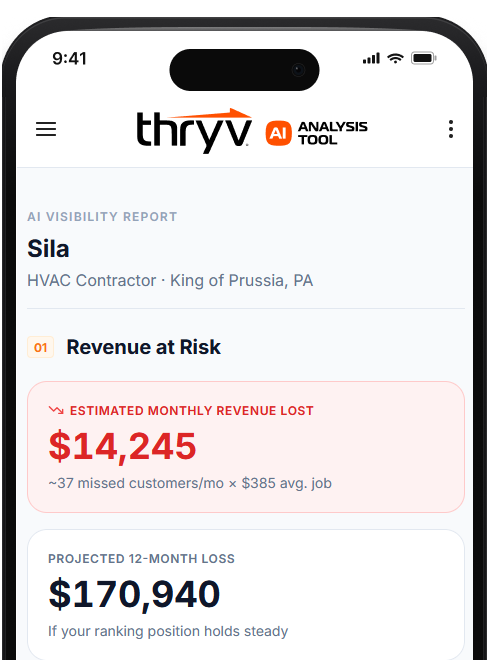
See How HVAC Businesses Use Thryv to Stay Visible and Win More Jobs
Thryv is built specifically for service businesses looking to grow. See how it handles visibility, reviews, and customer follow-up — and whether it fits where your business is right now.
The Features That Separate Good HVAC Software from Great HVAC Software
When you’re evaluating HVAC business software, the difference shows up in your day. It’s whether you can complete more work orders, keep job costs under control, and turn each job into repeat business without adding more to your plate.
Even when the basics are in place, opportunities still get missed. A completed job doesn’t lead to a review. A new inquiry sits unanswered during a busy afternoon. A satisfied customer doesn’t hear from you again.
The right features help you capture more of the work already happening and turn it into consistent revenue.
Scheduling & Dispatching – The Foundation
A technician finishes a repair and heads across town for the next job, only to find the timing no longer aligns. The customer has been waiting without any updates and is already frustrated.
This is when schedules start to fall apart.
Scheduling and dispatching tools keep work orders moving in real time so your team knows where to go and when. When something changes, the schedule updates, and everyone stays aligned:
- More completed work orders each day
- Fewer missed or delayed appointments
- Smoother service operations across your team
For example, when a job runs long, Thryv’s appointment booking system updates the schedule and automatically notifies the next customer. The customer stays informed, and you keep the job instead of losing it.
Online Reputation Management – Win More Calls
A homeowner searches for HVAC repair during a heatwave. They compare two businesses. One has recent reviews from the past few days. The other hasn’t had any in months.
They choose the one that looks active.
BrightLocal reports that 87% of customers read reviews before choosing a business. In HVAC, that directly impacts how often you get the call:
- More reviews → better visibility in search
- Higher ratings → stronger first impression
- More visibility → more inbound calls
After a job is completed, timing matters. With Thryv, a review request is sent automatically as soon as the work order is closed. AI Review Response drafts a reply so you can stay active without logging in every time. Within a few weeks, that consistency leads to more calls.
Local Listings Management – Getting Found
A customer searches for “AC repair near me” on a hot afternoon. Your business shows up, but your hours are wrong on one listing, and your phone number is outdated on another.
So they move on quickly.
BrightLocal found that 62% of customers avoid businesses with incorrect information. In HVAC, that can mean missing same-day repair work:
- Accurate listings → more visibility in local search
- Easier contact → more calls
- More calls → more booked work orders
Keeping local listings updated manually takes time and often gets skipped. With Thryv’s local listings management, your business information stays consistent across platforms so customers can reach you without friction when they need help.
AI-Powered Website Builder – Professional & Optimized Site
A no-heat call comes in during the winter. The customer visits your website but can’t tell whether you offer emergency service or cover their area.
They leave and call someone else.
Your website should answer key questions quickly. When it does, more visitors turn into calls and booked work orders:
- Clear service information → more visitors convert to calls
- Better customer experience → more bookings
- AEO optimization → visibility in Google AI Overviews and voice search
With Thryv’s AI-powered website builder, your pages stay updated based on your services. That means when someone lands on your site, they can quickly decide to contact you instead of continuing their search. It also helps your business appear in AI-generated recommendations and search results, so customers can find you in more places when they need HVAC services.
Social Media Management – Stay Visible Between Jobs
During slower months, calls can taper off. A homeowner scrolls through local HVAC companies and notices one that’s been sharing recent work and updates.
That business is easier to remember when service is needed.
Staying active helps keep your business top of mind so customers don’t have to search again:
- Consistent activity → more local recognition
- More recognition → more inbound calls
- Ongoing visibility → stronger customer relationships
After completing a job, Thryv’s AI Content Assistant and CaptionAI can turn that work into a social media post you can review and publish in minutes. Over time, that steady presence helps bring in more leads without adding extra work.
Invoicing & Payments – Get Paid Faster
You wrap up a long day of jobs and realize invoices still need to be sent. By the time you get to it, payments are already delayed.
Even small delays can impact cash flow.
Automated invoicing helps you send bills immediately after a work order is completed and follow up if payment hasn’t been received without manual tracking:
- Faster payments → improved cash flow
- Fewer overdue invoices → less time chasing payments
- Automated reminders → consistent follow-up without manual effort
With Thryv’s automated payments, invoices are issued as soon as the job is complete, and reminders are handled automatically. That keeps revenue moving without adding extra steps.
Automated Lead Response – The Job Is Won Here
A customer submits a request late in the evening after their system stops working. By the next morning, they’ve already heard back from another company and scheduled the repair.
The opportunity is gone before the day even starts.
Automated lead response helps you stay in the conversation, even when you’re not available:
- Immediate replies → more inquiries turn into booked jobs
- Centralized communication → fewer missed messages across calls and texts
- Consistent follow-up → more leads convert instead of going cold
For example, if a message comes in after hours, Thryv’s AI Lead Insights can send a quick response to let the customer know you’ll follow up. That keeps you in consideration and gives you a better chance of booking the job the next day.
See What Thryv Can Do For Your Business
Reputation management, local listings, social media, and an AI website builder — all included. See how it fits your HVAC business before you commit.
How Thryv Handles the Jobs Other HVAC Software Doesn’t
You can have a full schedule and still see uneven results. Some leads don’t turn into jobs. Some customers don’t come back. The difference often comes down to what happens between the work itself. When those moments aren’t handled, opportunities get missed.
Thryv focuses on those points, so more of your day is spent on booked jobs and repeat business.
AI Lead Insights
A busy Tuesday morning brings in a mix of calls and messages. Some are routine maintenance. Others are urgent breakdowns.
AI Lead Insights looks at incoming inquiries and flags which ones are most likely to turn into immediate jobs, so you can prioritize who to call first. Instead of working through leads in order, you focus on the ones that need help now. That can mean the difference between booking a same-day emergency repair or missing it while you’re tied up on a lower-priority call.
AI Review Response
After a long HVAC install, asking for a review and replying to feedback usually gets pushed off. Over time, your profile looks inactive, and fewer people choose your business.
AI Review Response drafts professional and personalized replies to customer reviews so you can respond quickly without sitting down to write each one. That keeps your profile active, builds trust with new customers, and helps you show up more often when people search for HVAC services.
AI Automation Assistant
You finish a water heater install and move on to the next job. A few days pass, and there’s no follow-up. That customer forgets about your business until the next issue comes up.
AI Automation Assistant keeps that connection going. After a job is completed, it can send a quick check-in message, followed by a seasonal reminder tied to preventive maintenance. For example, after an AC tune-up, a reminder can go out before peak summer demand hits again. That keeps your business top of mind and turns one job into future work without adding anything to your day.
CaptionAI + AI Content Assistant
You complete a duct cleaning or install and move on. That job could help bring in the next one, but it never gets shared.
CaptionAI and AI Content Assistant turn job details into ready-to-post content so you can stay visible without slowing down your day. Instead of thinking about what to post, you can take a quick photo, and the tool generates a caption you can review and share. That steady activity helps bring in calls, especially during slower weeks.
AEO/SEO Services
Customers search for HVAC services every day, often when they need help right away. If your business doesn’t show up or looks inactive, you won’t get the call.
AEO/SEO services help your business appear when someone searches for terms like “AC repair near me” or “emergency HVAC service” and give customers a reason to choose you.
This includes keeping your business information accurate, improving how you appear in search results, and making sure your content reflects the services you offer. When that’s handled consistently, more searches turn into calls without extra effort on your end.
What a Real HVAC Workday Looks Like With the Right Software
Before changing how they managed their day, Ely Heating & Cooling faced the same issues many HVAC teams face: calls came in while they were on jobs and went unanswered. Follow-ups were inconsistent. Reviews were hit-or-miss, making it harder to stand out in local search.
The work was there, but not all of it turned into revenue.
Once they improved their communication, follow-up, and visibility, things started to shift. Leads were answered sooner. Reviews became more consistent. More completed jobs led to repeat business.
Those changes add up quickly. When response and follow-up stay consistent, more of the work you’re already doing turns into steady calls and booked jobs. You can see how that plays out in a real HVAC operation by looking at how Ely Heating & Cooling adjusted their day-to-day workflow.
A Day in the Life With Thryv
The day starts with a full schedule and a few open spots for same-day jobs.
Mid-morning, a new inquiry comes in while you’re wrapping up a repair. It gets a quick response, and by the time you’re free, the job will be ready to book. That fills a gap in your schedule that might have gone unused.
After completing a service call, a review request is automatically sent. The customer leaves feedback that afternoon. AI Review Response drafts a professional reply that you approve in seconds. That review will make your business stand out when someone searches next time.
Toward the end of the week, a follow-up message goes out to a recent install. That leads to a preventive maintenance visit being scheduled for the next month. The AI Automation Assistant sent it.
By the end of the day, invoices are already sent, and payments are in progress. The work hasn’t changed. You’re still handling jobs and serving customers. The difference is that fewer opportunities are missed and more of your daily work generates consistent revenue.
How One HVAC Business Used Thryv to Grow Without Hiring More Staff
See how a real HVAC company used Thryv to collect more reviews, improve local visibility, and build a consistent flow of work — without adding headcount.
How to Choose the Right HVAC Software for Your Team Size and Goals
After looking at different options, the real question becomes simple: which one actually helps your business grow? The right choice depends on where you’re losing jobs today. Some businesses need help getting more calls. Others need to respond faster or stay in touch after the job. When you focus on that first, the decision gets clearer.
Start with the Problem You’re Actually Trying to Solve
Think about what’s costing you work right now.
- If calls are inconsistent, the issue is visibility. You need to show up more often when customers search.
- If leads are coming in but not booking, the issue is response speed. Jobs are being decided before you call back.
- If customers don’t return, the issue is follow-up. The job ends, and the relationship stops there.
For example, if you’re getting calls but losing them during busy days, look for a system that keeps messages in one place and responds right away. If your schedule dips between seasons, you need something that helps you stay visible and drive demand.
Many owners start by exploring different HVAC business management tools and realize that fixing one gap at a time can still leave other problems unresolved.
Match the Tool to Your Team Size
Your team size changes what you actually need.
- If you’re running a smaller operation, you need something simple that helps you respond faster and stay organized without adding extra steps.
- As your team grows, coordination becomes the bigger challenge. Scheduling, communication, and follow-up need to stay consistent across multiple technicians.
- If you’re managing several people and a steady flow of jobs, look for a setup that keeps everything connected so fewer details get missed during the day.
Questions to Ask Before You Sign Up (Checklist)
Before committing to any software, run through a quick check:
- Does it send a review request after every completed job? If not, you’ll keep missing opportunities to build local visibility in search
- Does it keep your business information accurate across listings? If not, fewer customers will be able to find you
- Does it handle routine follow-up and marketing tasks for you? If not, those tasks will fall behind during busy weeks
- Does it replace multiple tools or add another one to manage? If it adds complexity, your workflow stays fragmented
- Is there a free trial that includes the features you actually need to evaluate?
- Will this help you get more jobs this month?
If the answer to most of these is no, it’s likely not solving the problem you started with. Choosing the right software comes down to this: does it help you bring in work, respond quickly, and turn completed jobs into repeat business without adding more to your day?
How to Get Results from HVAC Software (Without Adding More Work)
You finish a job, move on, and everything else gets delayed. The review isn’t requested. The missed call goes unanswered. That’s where results start to slip.
If you only do one thing this week, turn on review requests after every job. From there, focus on a few simple steps:
- Send a review request after every job: When the job is fresh, customers are more likely to leave feedback. If that step gets delayed, it often doesn’t happen. Setting this up to run automatically helps you build reviews consistently, which improves how often you show up in search and how often customers choose you.
- Set an auto-response for missed calls and messages: If you’re on a job and can’t answer, the customer won’t know. A quick response letting them know you’ll follow up keeps them engaged instead of moving on.
- Post one completed job each week: A simple photo and short caption of what you fixed keeps your business visible and shows potential customers what you actually do.
These steps don’t add work. They help you get more value from the work you’re already doing without requiring extra time from your day.
Simplify Your HVAC Business and Grow With Less Effort
You’re already doing the work. You’re handling jobs, managing your schedule, and keeping customers satisfied. The challenge is keeping everything around that work consistent. Calls come in while you’re busy. Follow-ups get delayed. Some weeks stay full, while others slow down without a clear reason.
The best HVAC software for small businesses closes those gaps without adding more to your day. It helps you show up in search, respond quickly, and stay connected with customers after the job.
When those pieces are handled, the results add up. More steady work week to week. Fewer missed opportunities. Less time spent on manual follow-up that should be running automatically.
You don’t need multiple tools to make that happen. You need a system that connects visibility, response, and follow-up so your daily work leads to more jobs and repeat customers.
Thryv brings your listings, reviews, website, social media, and follow-up into one place so those gaps are handled automatically. If you want to see how it works for your HVAC business, it’s worth taking a closer look.
Stop Running Your HVAC Business on Memory and Manual Work
Thryv helps small HVAC businesses collect more reviews, improve local search visibility, and turn every completed job into the next one. Start with a free trial — no commitment.
Frequently asked questions
The best HVAC software is the one that helps you get more calls, respond quickly, and stay organized without adding more work. Many tools focus on scheduling and invoicing, but that only covers part of your day. A strong option combines business management software with features such as work order management, customer follow-up, and visibility tools, so more jobs actually get booked. Expect to spend anywhere from $50 to $300+ per month, depending on features and team size.
Yes, but only if it improves how customers find and choose your business. Software that helps you show up in search, collect reviews, and respond quickly can increase the number of calls you receive. Results usually start to show within a few weeks if reviews and follow-up are consistent. The biggest gains come from capturing more of the leads you’re already getting and turning them into completed jobs.
Field service management software focuses on managing jobs once they’re booked, like scheduling, dispatching, and invoicing. HVAC software can include those tools, but often goes further by supporting maintenance schedules, customer follow-up, and even inventory management for parts and equipment. If your schedule is full but inconsistent, that added support helps you keep work coming in and improve job completion rates.
Yes, and it can make a bigger impact on smaller teams. When you’re handling calls, work orders, and follow-ups yourself, it’s easy for things to slip through. Software can help with time tracking, sending invoices through HVAC invoicing software, and keeping your day organized without extra effort. Some tools also support basic fleet tracking and reminders, which makes it easier to stay on schedule and deliver consistent customer support.
Yes, and it can make a bigger impact on smaller teams. When you’re handling calls, work orders, and follow-ups yourself, it’s easy for things to slip through. Software can help with time tracking, sending invoices through HVAC invoicing software, and keeping your day organized without extra effort. Some tools also support basic fleet tracking and reminders, which makes it easier to stay on schedule and deliver consistent customer support.