Search Engine Optimization for Small Business: A Beginner’s Guide
Try Thryv for FreeBy Allison Sakounthong, Small Business Expert
Updated October 14, 2026 · 37 min read
Key Takeaways
- SEO helps make your website and business information easier for search engines to understand and easier for potential customers to find.
- Start with your Google Business Profile and listings, since outdated hours, phone numbers, or business information can directly create missed opportunities with customers.
- The same accurate information that helps you rank on Google can also give AI tools better material to work from.
- SEO works best when you connect visibility to business outcomes, such as calls, quote requests, appointments, and booked jobs.
- You can handle many SEO basics yourself, but expert support may make sense when technical work, content, or ongoing optimization becomes too time-consuming.
45% of consumers now use AI tools like ChatGPT to find local businesses, up from just 6% a year earlier, according to BrightLocal’s 2026 Local Consumer Review Survey.
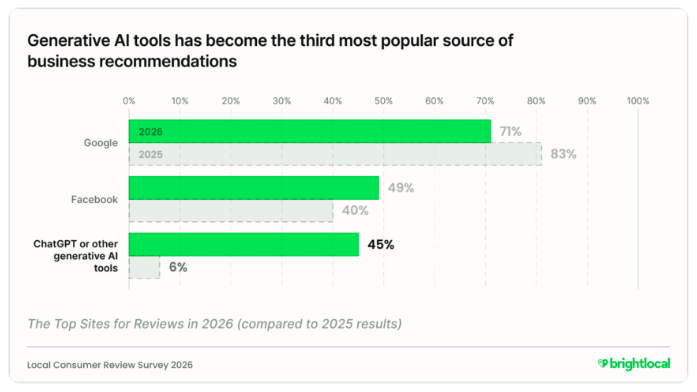
Where customers discover a business keeps shifting. What they need to see before they call has stayed the same.
Search engine optimization, or SEO, means improving your website, business listings, reviews, and content so search engines can understand what your business does, where you operate, and why customers should trust you. Those same signals can also give AI-powered tools clearer, more consistent information about your business when people ask for local recommendations.
For small business owners, the harder part is knowing what deserves attention. SEO advice turns quickly into technical discussions about keywords, backlinks, rankings, site structure, and now AI search. Or you hire someone to handle it and still wonder what they’re doing and whether it’s working.
This guide covers the fundamentals that affect whether local customers find you. You’ll see what you can handle yourself, what takes time to show results, and when outside help is worth paying for.
What Is SEO for Small Business?
SEO covers the work that makes your business easy for search engines to find, understand, and match to what someone’s searching for. That includes your website, business listings, reviews, and content that answers common customer questions.
Google’s own SEO Starter Guide describes the goal as helping search engines find, crawl, and understand your pages well enough to match them to relevant searches.
For a local service business, that means a plumber in Tampa appears when someone in Tampa searches for a drain cleaning company. It means your hours are right when someone checks at 8 pm. It means the page explaining water heater replacement actually says which neighborhoods you cover.
SEO doesn’t cost you money per click, though it isn’t free either. You’re paying with time, content, and often outside help.
SEO vs. SEM: What’s the Difference?
SEO earns visibility in organic search results, which are the unpaid listings below and around the ads. You improve your pages, listings, and reviews, and search engines decide where you rank.
Search engine marketing (SEM) usually refers to paid search advertising. You bid on keywords, your ad runs at the top of the search engine results pages (SERP), and you pay when someone clicks.
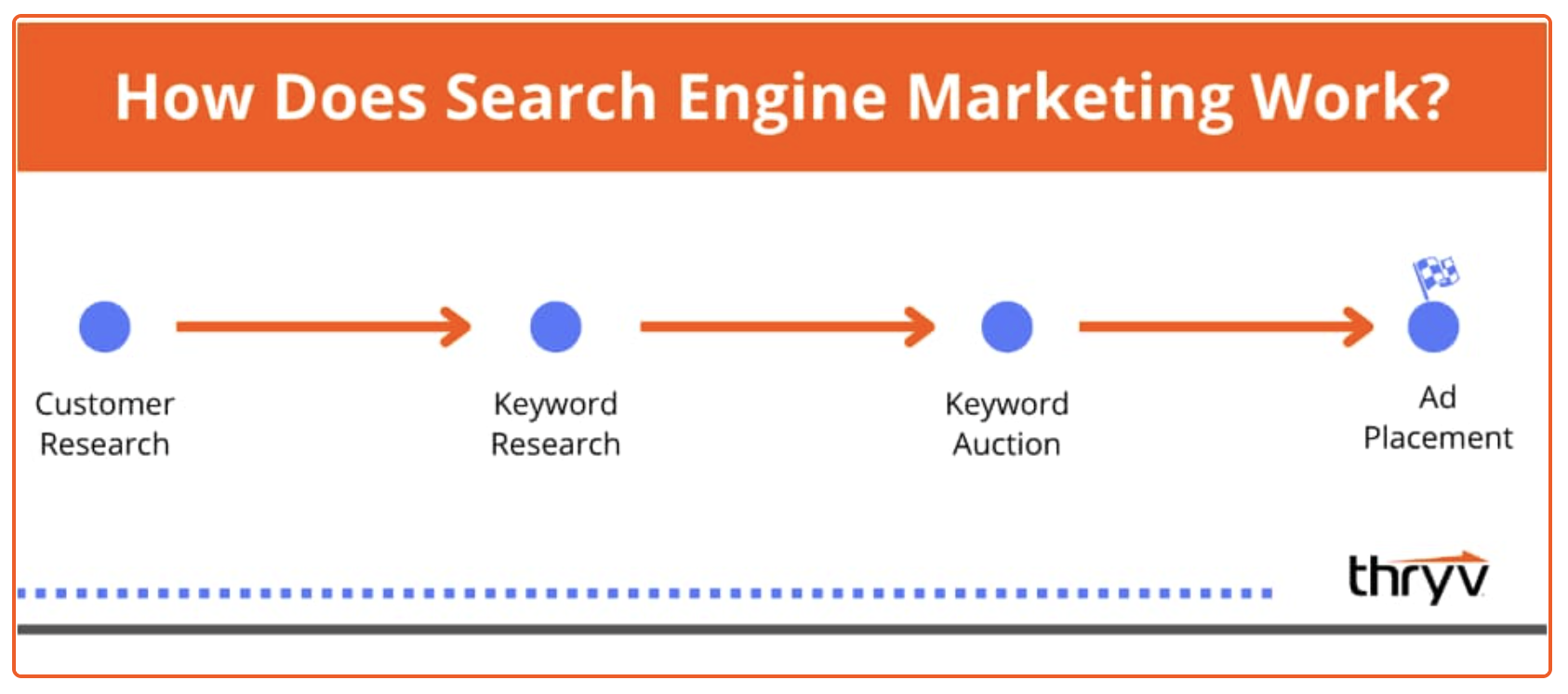
The two work on different timelines:
- SEO typically takes time to build, and sustained visibility depends on factors such as competition, website quality, content, reputation, and ongoing optimization.
- Paid search (PPC) can generate visibility as soon as campaigns are active, but that visibility generally stops when the campaign or budget stops.
- Together, they cover different needs. Ads can fill a slow month or push a seasonal service, while SEO builds the listings, reviews, and pages customers check before calling.
Most local service businesses treat SEO as the foundation and use paid search for specific gaps.
How Do Search Engines Work?
Search engines have to find and understand your website before they can show it to potential customers. The U.S. Chamber of Commerce breaks this process into three core functions:
- Crawling: Search engines discover and read pages across the web.
- Indexing: They organize the pages they find so they can retrieve relevant information when someone searches.
- Keyword ranking: They decide which pages are most relevant to a search and in what order to show them.
SEO helps make your website easier to crawl, understand, and connect with relevant searches. For a local business, that could help a service page for “emergency AC repair in Phoenix” appear when someone nearby searches for that service.
You don’t need to follow every algorithm update. Concentrate on making your services, service area, and customer answers easy to read on the page.
How SEO Helps Local Service Businesses Get Found & Chosen
Customers rarely call the first business they see anymore. They check reviews, compare a couple of websites, confirm the service area, and look at how recently the business posted anything. That research now happens across Google, maps, review sites, and AI assistants, often in the same few minutes.
That’s why SEO shows up in your calendar rather than your analytics dashboard. Here’s what it affects:
- Getting found. That jump in AI-assisted searching is why accurate listings and clear service pages matter more than they did two years ago. Accurate listings and clear service pages give search systems more context about what you do and where you work.
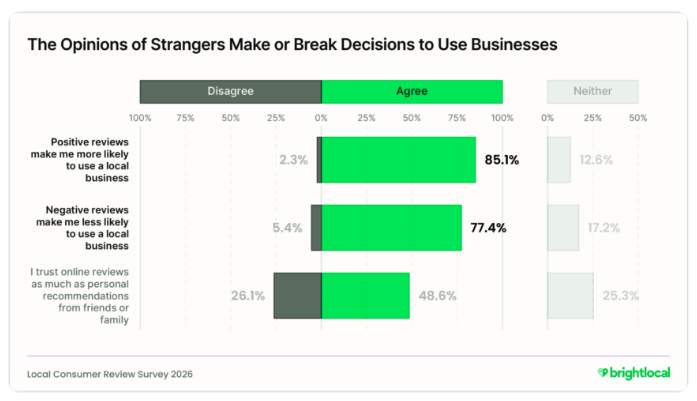
- Getting chosen. BrightLocal’s 2026 survey also found 85% of consumers are more likely to use a business after reading positive reviews, while 77% are put off by negative ones. Review quantity, ratings, and how current the feedback appears can all influence how customers compare similar businesses.
- Building visibility that compounds. A service page you publish this quarter can keep bringing in quote requests long after you wrote it. Reviews, listings, and content keep working after the initial effort, which is why consistency matters more than intensity.
None of this requires you to become a marketer. It requires knowing which few things affect whether customers find you, then keeping those current. The next section covers what to fix first.
See Where Your Business Gets Found
Run a free scan to uncover visibility gaps that could make your business harder to find.
Small Business SEO Checklist: Get Started with the Basics
You don’t need every SEO tactic that exists. Ten fundamentals cover most of what affects whether a local customer finds you and decides to call. Small business SEO works best when you pick a few SEO strategies and stay consistent with them.
Work through them in order if you’re starting from scratch. If you’ve handled some already, skip to whatever you haven’t touched in a year.

Small Business SEO & AEO Visibility Checklist
Free Guide
Small Business SEO & AEO Visibility Checklist
Optimize your business for search engines, AI answers, and zero-click discovery. Use this step-by-step checklist to improve visibility, strengthen trust signals, and turn online searches into real customer inquiries.
Do Keyword Research the Simple Way
Keywords are the words customers type when they need what you sell. A homeowner with a flooded basement searches “emergency plumber near me,” and near me searches often signal someone ready to book.
Start by listing the services you want more of, then write out how a customer would describe each one. Add your city or service area to each phrase. Free keyword research tools like Google Keyword Planner and Google Trends show search volume, while Google Search Console shows which searches already bring people to your site. Google Trends also reveals seasonal patterns, so an HVAC company can see when furnace searches climb.
Focus on searches tied to booked work before chasing the ones with the biggest search volume.
Make Sure Your Website Is Easy to Use
A customer landing on your site should understand what you do, where you work, and how to reach you within a few seconds. If they have to hunt for a phone number, they’ll go back to the search results.
Check your site on your phone first, since that’s where most local search happens. Time how long the homepage takes to load, and put a click-to-call button near the top of every page. Businesses serving several towns benefit from separate location pages, and dedicated landing pages for your main services help customers confirm they’re in the right place. A website builder for small business makes those updates possible without a developer.
Quick test: Give someone who doesn’t regularly use your website 30 seconds to find a specific service and contact your business. If they struggle, your customers probably do too.
Optimize Your Google Business Profile
For many local searches, customers may encounter your Google Business Profile before they visit your website.
Focus on the information someone needs to decide whether to contact you:
- Correct business hours, phone number, website, categories, and service areas
- Recent photos that accurately represent your business or work
- Up-to-date services and other relevant business information
Don’t treat your profile as something you set up once and leave alone. Update it when your hours, services, contact details, or other important information change.
Thryv’s Google Business Profile management helps businesses manage their profile and keep key information current.
Get Your Listings Consistent Across the Web
Your business information appears across local directories, review sites, and Google Maps. When your hours or phone number differ between them, customers get confused, and search engines get less confident about which details are correct.
Search your business name and check the first two pages of results for old addresses, wrong numbers, and duplicate profiles. Fix the biggest platforms first, which usually means Google, Yelp, Facebook, and Bing. Keeping your name, address, and phone number (NAP) consistent across listings makes it easier for customers and search engines to encounter the same business information wherever they look.
Updating each one manually gets impractical fast. Thryv’s business listings management software syncs your hours, phone number, and service areas across supported directories, so a single change reaches every platform that matters.
Build and Manage Reviews
Online reviews can support both local visibility and customer trust. Google says review count and positive ratings can contribute to local ranking, while recent customer feedback can reassure potential customers that a business is active and delivering current experiences.
Ask customers for honest feedback soon after finishing the job, while the experience is still fresh. A Google review link generator gives customers a direct link instead of making them search for your profile. Respond to reviews consistently, including critical feedback. Thoughtful responses show potential customers that you pay attention to customer experiences and take concerns seriously.
Reputation management software for small business handles the requests and helps you respond during busy weeks, and automated reviews for small business keep the asks going out without anyone remembering to send them.
Free Guide: Customer Review Strategy for Small Business
Free Guide
Free Guide: Customer Review Strategy for Small Business
Turn customer feedback into a powerful growth tool. This practical guide shows you how to build a consistent review strategy that strengthens trust, improves visibility, supports conversions, and turns positive customer experiences into marketing assets that help drive more business.
Create Helpful Content on Your Website
You probably already have a list of content ideas. They’re sitting in your inbox, call logs, sales conversations, and customer appointments.
Listen for questions such as:
- How much will this cost?
- Why does this keep happening?
- Can this be repaired or does it need replacing?
- How long will the service take?
- Do you serve my area?
Turn useful questions into FAQs, service-page content, or articles. For example:
- A dentist could explain what happens during an emergency dental appointment
- A roofer could explain when storm damage requires a repair
- A plumber could answer why a water heater keeps losing hot water
This gives customers useful information while giving search engines more context about your services and expertise.
Clean Up Your On-Page SEO Basics
On-page SEO covers the details on each page that tell search engines what it’s about. These are small fixes, and most owners can handle them in an afternoon.
| Check | What Good Looks Like |
| Page title | Clearly describes the service and relevant location |
| Main heading | Makes the page topic immediately clear |
| Meta description | Gives searchers a useful reason to visit |
| Internal links | Connects visitors to related services and resources |
| Page copy | Answers the questions someone considering that service would have |
Keep the language natural. Write the page for the customer who needs the service, then make sure its topic is clear enough for a search engine to understand.
Build Trust Beyond Your Website With Off-Page SEO
Some SEO work happens away from your own website. Link-building from relevant organizations, publications, directories, and other businesses can provide additional context about your company.
Look close to home first. A local contractor might join the chamber of commerce, contribute advice to a local publication, participate in a community event, or earn a mention from a supplier or business partner.
Those are meaningful connections with a reason to exist. Focus on earning relevant mentions and links instead of buying large batches of links from unrelated websites.
Say a roofing company sponsors a local community event. The event website lists participating businesses and links to the roofer’s website. That link makes sense for the organization, the business, and people visiting the page.
Technical SEO Basics Worth Knowing About
Technical SEO covers how your site is built rather than what it says. You probably won’t handle this yourself, and that’s fine. Knowing the terms helps when you’re talking to a developer or evaluating whether someone’s doing the work you’re paying for.
A technical audit checks the parts of your web property that affect whether a web crawler can read your site properly. A technical audit usually surfaces:
- URL structure. Page addresses should describe the page, so /drain-cleaning-tampa works better than /page-id-4471.
- Structured data. Also called schema markup, this code can give search engines additional context about information on your website, such as your business, services, or location. It does not guarantee higher rankings or enhanced search results.
- 404 status code and 404 Page. When a page is deleted, the server returns a 404 status code. A useful 404 page points visitors back to your services rather than leaving them stuck.
- Page speed and mobile optimization. Slow pages can frustrate visitors, so check that important pages load quickly and work well on mobile devices.
- Security check. Your site should load over HTTPS, which browsers flag when it doesn’t.
- Favicon optimization. That’s the small icon showing beside your name in browser tabs and search results.
- Category and tag pages. If your content management system generates these automatically, thin or duplicate versions can clutter what Google indexes.
Your content management platform handles some of this by default. The rest is worth asking about once the fundamentals above are in place.

Free Checklist: Visibility Checklist
Build a stronger online presence with a practical checklist designed to improve your visibility across search engines, maps, social media, reviews, and AI-powered search. Learn how to strengthen the trust signals that help customers find, choose, and confidently do business with you.

Track What Turns Search Into Leads
SEO metrics only become useful when you connect them to business results. Think of the process as a simple chain: search visibility should lead to website visits, visits should lead to inquiries, and inquiries should ultimately lead to booked customers.
Google Search Console can show which searches generate impressions and clicks. Analytics can show what organic visitors do after arriving. Your lead tracking can tell you whether those visits become calls, quote requests, appointments, or bookings.
A simple monthly scorecard is enough for many small businesses:
| Watch | Ask |
| Search visibility | Are more potential customers seeing us? |
| Organic clicks | Are more people visiting from search? |
| Calls and forms | Is that attention producing inquiries? |
| Bookings or sales | Are those inquiries becoming business? |
Watch trends across months and pay closest attention to the searches and pages producing calls, forms, and bookings. Those tell you where to put the next hour of work.
How SEO Helps You Get Found in AI Search
SEO used to be discussed mainly in terms of rankings and clicks from Google. Now customers can ask an AI tool for a shortlist of local businesses without scrolling through search results at all.
That makes everything you’ve improved in this checklist useful in a second context. AI-powered tools may draw on websites, listings, and review platforms when responding to questions about local businesses.
What Is Answer Engine Optimization (AEO)?
Answer engine optimization (AEO) is the practice of making your content and business information easier for answer engines and AI-powered search tools to understand and potentially use in direct answers. For local businesses, that includes keeping information about your services, locations, and reputation clear and consistent across your website and other relevant sources. Different tools handle this differently, and none of them publish exactly how they decide what to surface.
AI has become a common starting point for local discovery. However, AEO doesn’t require you to replace your SEO strategy. Instead, it extends the work you’re already doing. One useful shift is to think beyond the short keywords people type into Google and consider the detailed questions they may ask an AI assistant. For example:
Traditional search: “roof repair Dallas”
AI-style query: “Who repairs storm-damaged roofs in Dallas and offers emergency appointments?”
A service page explaining the types of roof damage you repair, the areas you cover, and whether emergency appointments are available gives both search engines and AI tools clearer material to work from.
No tactic guarantees your business appears in an AI-generated answer. Clear, consistent information can help these tools describe you accurately when they do.
Thryv’s AI tools can help small businesses incorporate AI into their marketing and day-to-day workflows without adding another disconnected system to manage.
Stop Guessing What to Fix First
Use this practical checklist to find the gaps that could be holding back your search and AI visibility.
How Much Does SEO Cost? Should You DIY or Get Help?
SEO pricing varies widely based on the provider, market, and scope of work. According to Backlinko’s survey of more than 300 SEO professionals, monthly retainers commonly fall within several different price ranges, reinforcing that there is no single standard cost for small-business SEO.
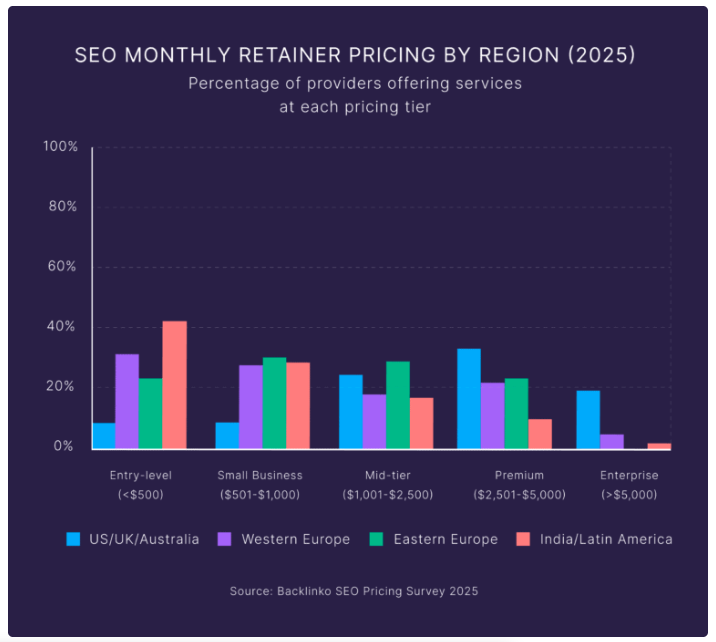
Your actual cost depends on how much work your business needs. A single-location plumber targeting a few nearby towns has a very different SEO workload from a dental group with six locations competing for searches across a major city. Competition, number of locations, website condition, content needs, and the scope of ongoing work can all affect the price.
You also don’t necessarily need to outsource everything. Google explains that small local businesses can probably handle much of their SEO themselves. Hiring an experienced SEO, however, can save time and bring expertise in areas such as technical SEO, keyword research, content development, local markets, and visibility across AI-powered search.
So, which approach makes sense for you?
| Approach | What you’re paying for | Best for | Main trade-off |
| DIY SEO | Your own time plus any tools or content costs | Owners with a simple website, one or a few locations, and time to learn and execute the basics | Low outside cost, but SEO competes with everything else you need to run |
| Consultant or freelancer | Specialist expertise for audits, strategy, technical fixes, content, or other defined needs | Businesses that can handle some SEO internally but need expertise in specific areas | You may still be responsible for implementing recommendations and keeping the work moving |
| Managed SEO + AEO | Ongoing strategy, optimization, content and execution across traditional and AI-powered search | Businesses that want expert support and consistent execution without managing each SEO task themselves | Higher ongoing investment than DIY or occasional specialist help |
The decision comes down to how much time you have, how much you want to learn, and whether you can keep the work going month after month.
If you can regularly update listings, improve pages, publish useful content, manage reviews, and track results, DIY SEO can be a reasonable starting point. If those tasks repeatedly fall to the bottom of your list, outside help may be worth the cost.
Be cautious of any provider promising a specific ranking or guaranteed placement in AI-generated answers. Google explicitly warns that no SEO can guarantee a #1 Google ranking. A good provider should instead explain what they’ll work on, why it matters, how they’ll measure progress, and what results are realistic.
For businesses that want ongoing support, Thryv Search Boosts provides expert-managed SEO and AEO work that runs alongside the tools you already use. Your existing website, booking system, and customer records stay where they are.
Take SEO Off Your To-Do List
Thryv Search Boosts give small businesses expert support for traditional search and AI visibility.
Small Business SEO Mistakes to Dodge
SEO eats time and budget without producing leads when the work drifts away from what customers actually do. Watch for these five mistakes:
- Stuffing pages with keywords. Use relevant terms naturally and give customers the information they came for.
- Expecting results overnight. Progress builds across months, so measure over a longer window before changing course.
- Ignoring customer reviews. Keep asking for reviews and keep responding to the ones you get.
- Skipping the mobile experience. Most local searches happen on phones, so check that yours is readable and easy to act on.
- Hiring help without clear deliverables. Ask what gets completed each month, how progress gets reported, and which work stays yours.
Your Next Steps for Getting Found Online
Before changing anything, check where and how your business currently appears in search. Outdated hours, incorrect contact information, and missing listings can create friction for customers and are often relatively straightforward to fix. Outdated hours, incorrect contact information, and missing listings can create friction for customers and are often relatively straightforward to fix.
From there, decide what you can realistically maintain. Keep the work you have time for and hand off whatever keeps sliding to the bottom of your list. Thryv Search Boosts gives you expert-managed SEO and AEO support that works with your current setup, and it connects to Thryv’s digital marketing software for small business if you want more of the work in one place.
Turn Search Visibility Into Real Leads
See how Thryv helps small businesses strengthen their visibility across search and AI.
FAQs About Search Engine Optimization for Small Businesses
For most local service businesses, yes. Customers are already searching for what you sell, and SEO puts you in front of them at that moment. The visibility keeps working after the initial effort, unlike ads that stop when the budget does. Whether SEO pays off depends on your average customer value, competition, and investment. A useful way to evaluate ROI is to estimate how many additional calls, appointments, or jobs would need to come from search for the time or cost to be worthwhile.
Whichever gap is losing you the most calls. If customers can’t find you at all, start with listings and your Google Business Profile. If they find you and don’t call, look at your reviews and how quickly your site loads on a phone. Most owners know which of those two describes their situation.
Yes. Google says review count and positive ratings can contribute to local ranking, while recent reviews can help customers judge whether a business is active and trustworthy. Reviews therefore matter both for visibility and for what happens after someone finds you.
No. What helps is having answers on your site to the questions customers ask before hiring. That can live on a service page or an FAQ section just as well as a blog. Ten useful pages beat a hundred thin ones.
Connect the numbers to outcomes. Search Console shows impressions and clicks, analytics shows what visitors do after arriving, and your own booking records show what became revenue. Asking new customers how they found you catches what the tools miss.
AI tools may draw on your listings, reviews, website, and Google Business Profile when answering questions about local businesses. Keeping that information accurate and consistent gives them better material to work from. Nobody can guarantee placement in any AI tool, though inconsistent information can make your business harder to describe correctly.