

When someone searches for a business like yours, they are not always clicking through to a website. More often, they are making a decision directly from what they see in search results.
That means your Google Business Profile is not just a listing. It is your first impression, your credibility check, and your fastest path to a new customer.
A complete and active profile helps you appear in local search results, builds trust instantly, and makes it easier for customers to call, book, or visit. An incomplete one does the opposite.

Free: Online Presence Scan
See how your business compares to the competition and find out what customers are saying about you.
Try NowThis guide walks through how to optimize your profile so it consistently brings in leads without adding more work to your day.
What is Google Business Profile Optimization?
Google Business Profile is a free listing that allows your business to appear in Google Search and Google Maps when people look for products or services nearby.
It includes:
- Business name, address, and phone number
- Hours of operation
- Reviews and ratings
- Photos and videos
- Services and offerings
- Questions and answers
Think of it as a built-in, search-driven landing page designed to capture high-intent local searches like “near me” or “open now.”
Unlike your website, this is often where customers decide whether to contact you.
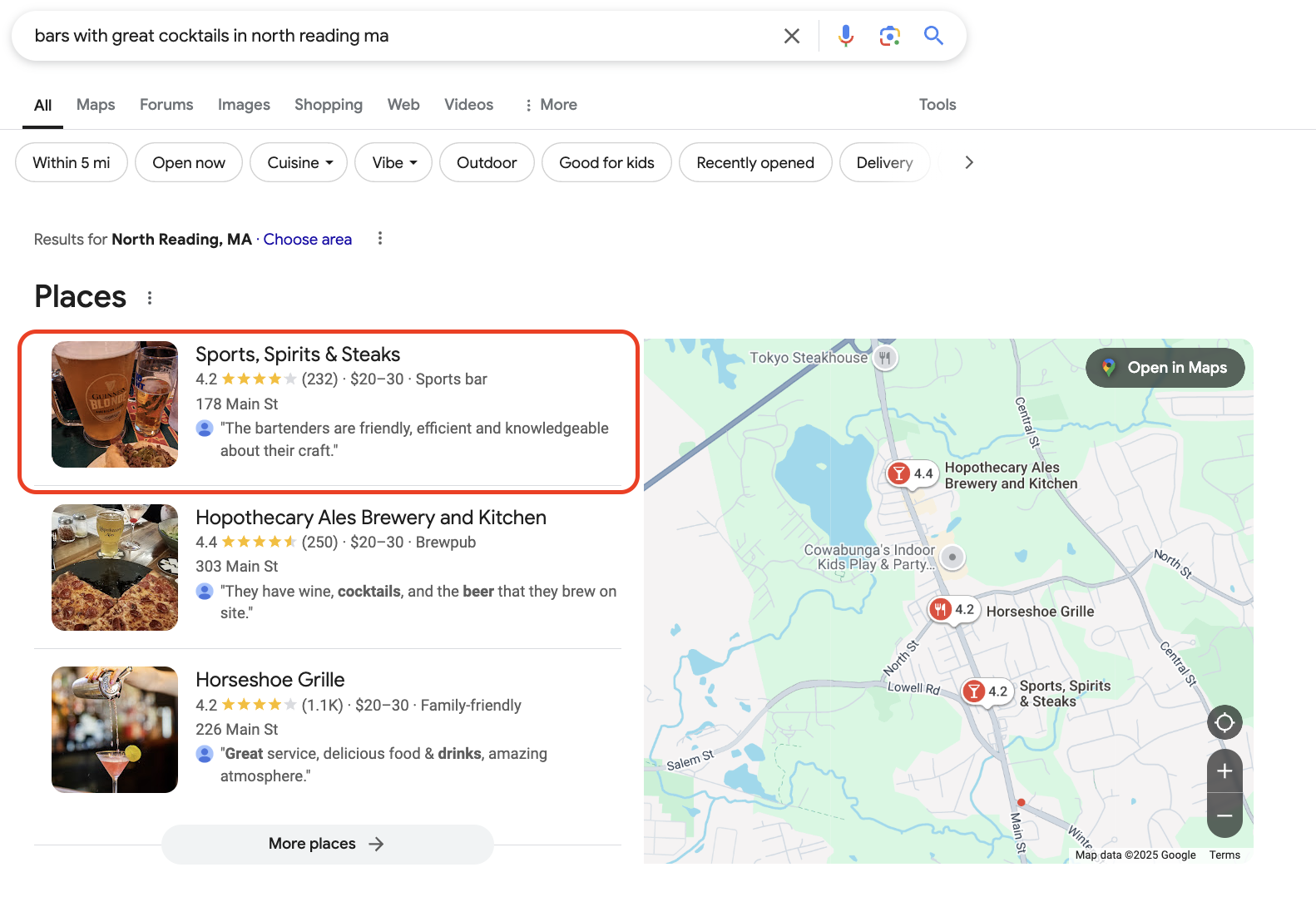
Here’s an example. Sports, Spirits, & Steaks is one of my favorite restaurants. Here’s its profile:
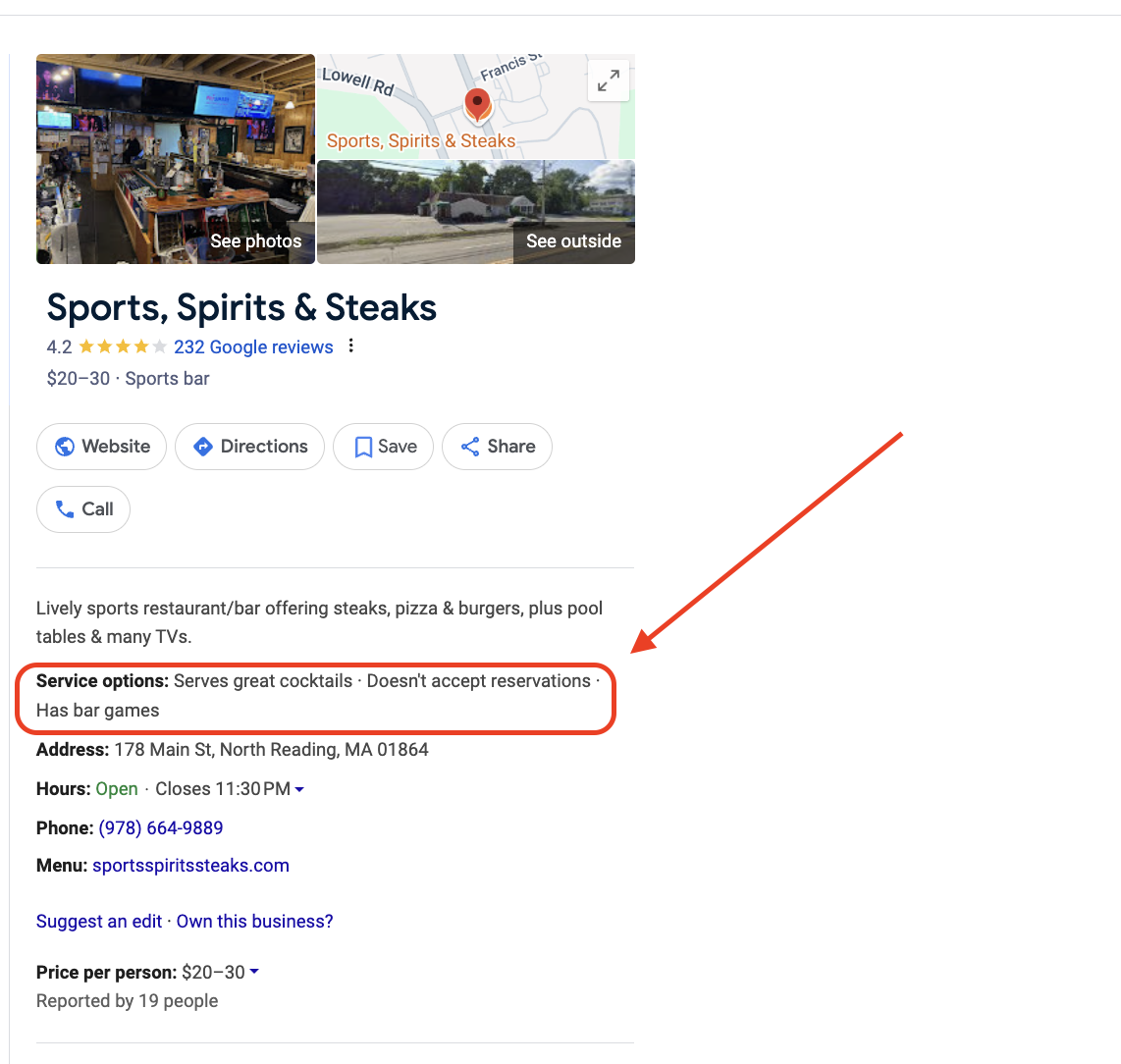
As you might have guessed, the core information is all there: business name, location, phone number, etc. However, it also includes details like “price per person” and “service options.” These descriptors add more context and make the restaurant easier to find on Google. If I searched for “bars with great cocktails in North Reading,” look what shows up first:
Why Google Business Profile optimization matters
An optimized profile directly impacts how often you show up and how many customers choose you.
Here is what it helps you do:
- Appear in Google’s Local Pack, the top map results customers see first
- Drive immediate actions like calls, directions, and bookings
- Build trust through reviews and up-to-date information
- Support voice search and AI-generated answers
As search continues to evolve, Google prioritizes businesses that are accurate, active, and relevant. The more complete and consistent your profile is, the more likely you are to be shown to the right customers at the right time.
How to Optimize Your Google Business Profile
Here are twelve steps you can take to optimize your Google Business Profile.
1. Complete and standardize your business information
Start with the basics, but make sure they are exact everywhere.
Your business name, address, and phone number must match across your website, directories, and social platforms. Even small inconsistencies can reduce your visibility in local search.
Make sure to:
- Use your real business name without extra keywords
- Enter a precise address and service area
- Add a local phone number
- Keep hours accurate, including holidays
Consistency builds trust with both Google and your customers.
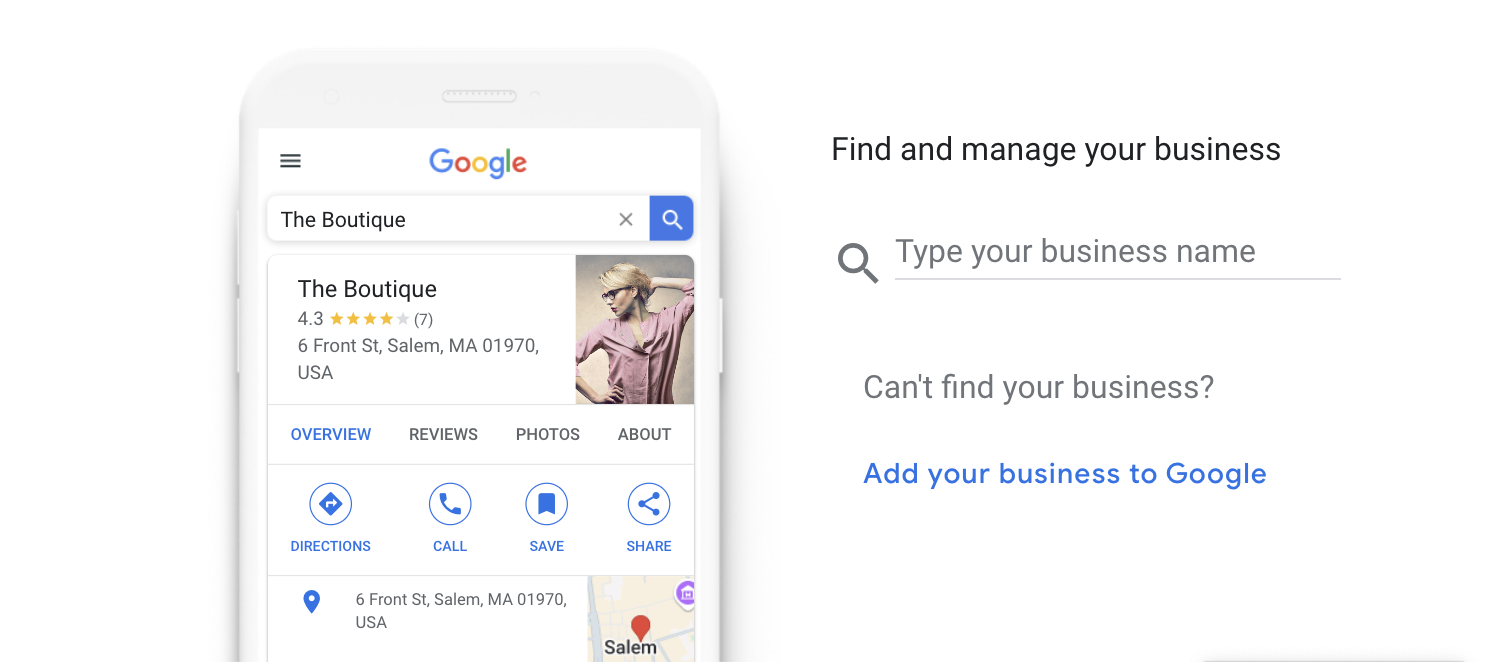
If your profile doesn’t exist, right-click Google Maps and select “Add my business.” Or, you can visit this page instead: https://business.google.com/create
2. Maximize your exposure with posts, reviews, and offers.
Google provides a selection of tools to help promote your profile. These features make your listing more robust, and using them shows Google that your profile is active.
Here are a few tools you should use to maximize your profile’s exposure:
- Google Posts: Google Posts help you share updates, offers, and events with your customers. They’re like social media posts where you can write captions, add images, and interact with people through comments and offers.
- Reserve With Google: This feature allows customers to book appointments through your Google Business Profile. It’s more convenient than directing people to your website.
- Google Reviews: Google Reviews shows how customers rate your business and helps Google determine which businesses to show first in search results.
- Google Q&A: The Q&A feature allows people to ask questions about your business so you can answer them publicly. Ex. “Is your business dog-friendly?”
- Google Maps: People use Google Maps to search for businesses in their area. Add your address to your profile so you appear on Google Maps.
3. Choose the right categories
Your primary category is one of the strongest ranking signals in your profile.
Select the category that best represents your core service. Then add secondary categories to expand into related searches.
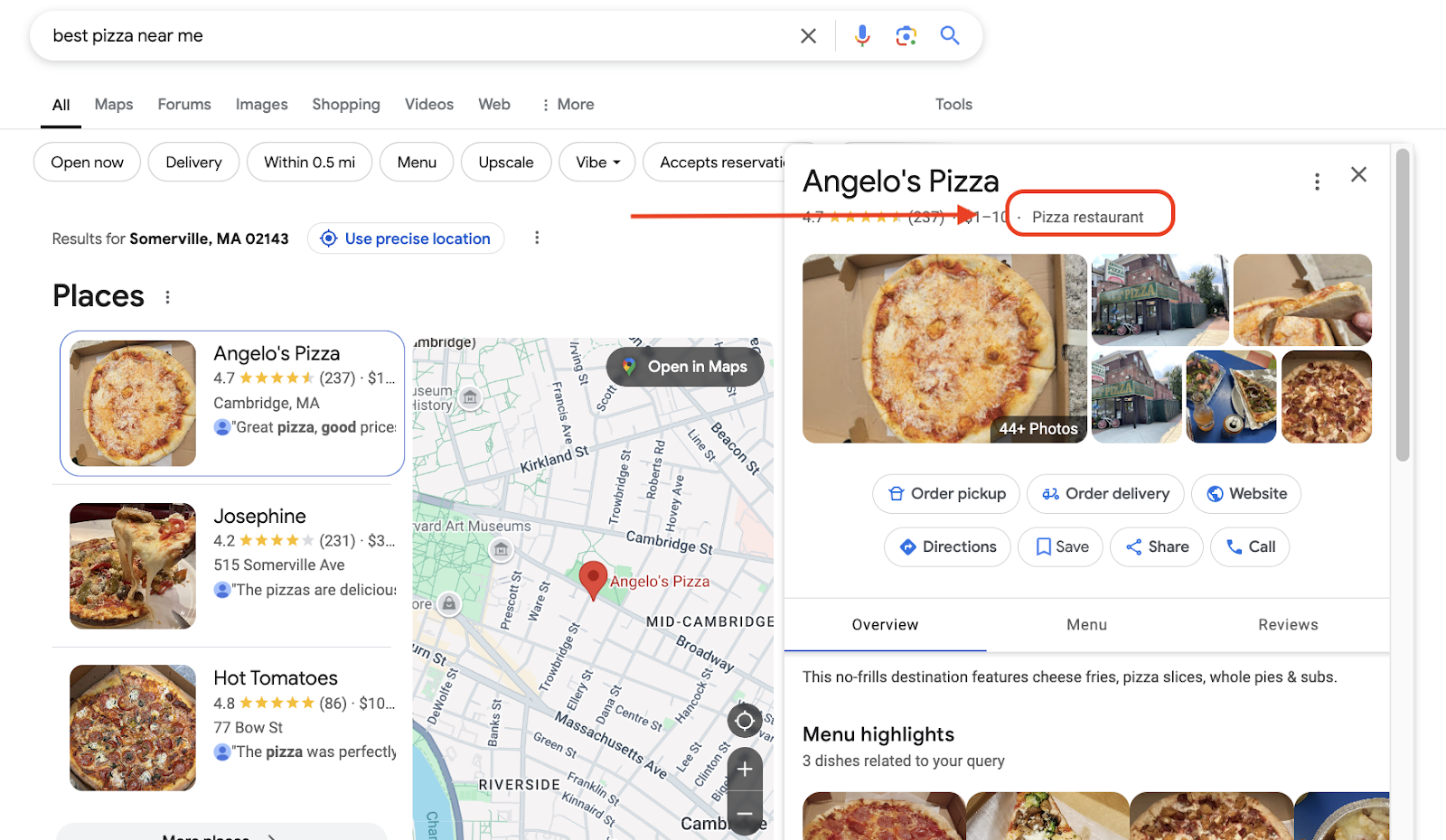
For example, a roofing company might choose:
- Primary: Roofing contractor
- Secondary: Roof repair, gutter installation
This helps Google understand when to show your business.
4. Collect and respond to reviews consistently
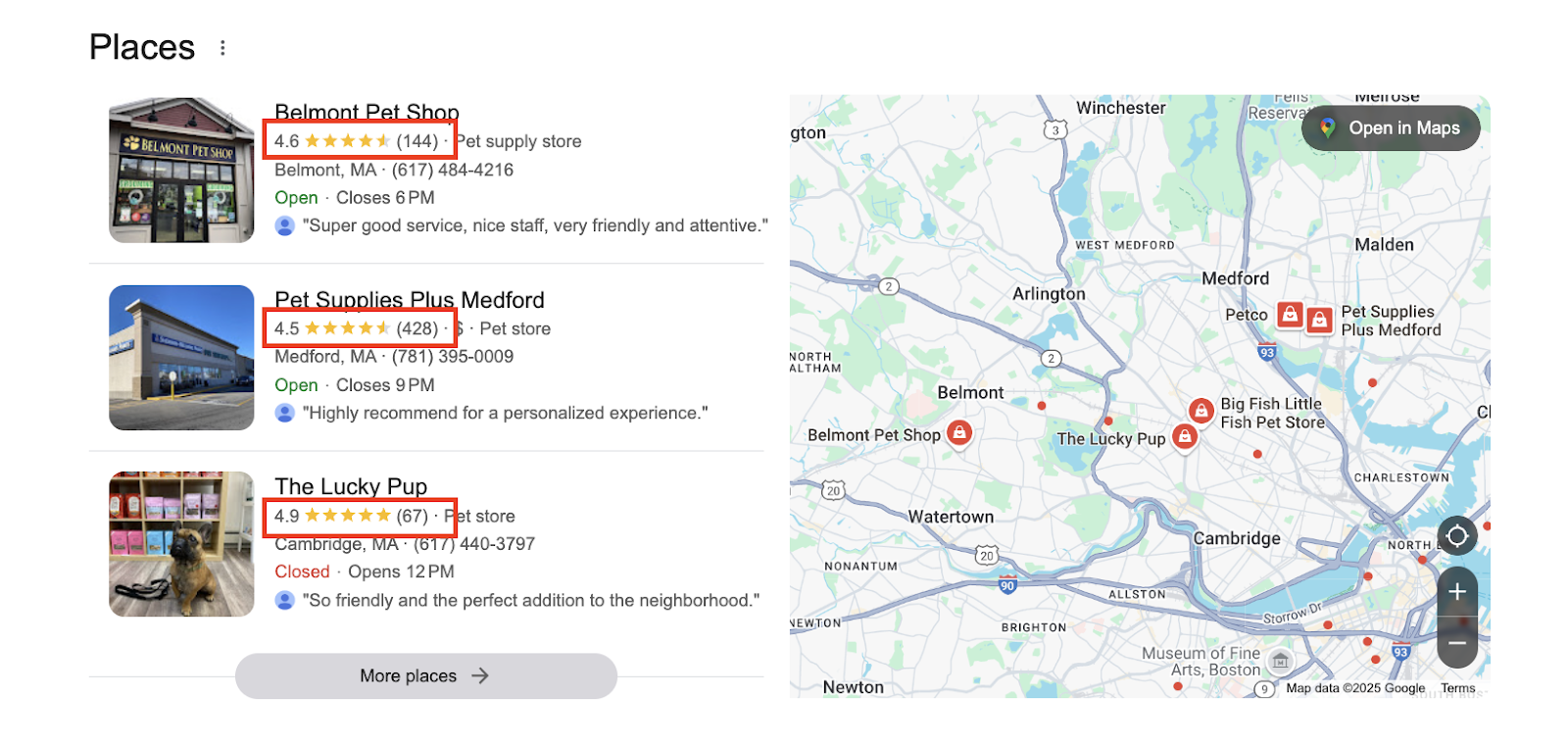
Reviews influence both visibility and decision-making.
A steady flow of recent reviews signals that your business is active and trusted. Responding to them shows you are engaged and reliable.
Best practices:
- Ask for reviews after every completed job
- Respond to all reviews, positive and negative
- Keep responses professional and helpful
- Naturally reinforce services or keywords when appropriate
Strong review activity can significantly improve both ranking and conversion.
While you shouldn’t directly ask for good reviews, you can (and should) ask customers to provide honest feedback. Use this Google Review Link Generator to create a convenient link to your online listing. Then, use email automation to immediately follow up after you make a sale or complete a service. Most people will leave you a review if you just ask for one, so this system helps you generate a steady stream of Google Reviews for your business.
Tip: Thryv’s reputation management feature makes it easy to get and manage reviews for your business.
5. Add high-quality photos and videos
Visual content builds trust quickly.
Profiles with real, updated photos get more engagement and more clicks. Customers want to see your work, your team, and your location before they reach out.
Add:
- Exterior and interior photos
- Team and workspace images
- Before and after project photos
- Short videos, if possible
Update these regularly to show your business is active.

Our Guides to Running an Efficient Small Business
Free Guide: The Ultimate Google Business Profile Guide
Learn how to optimize your Google Business Profile to get found online, attract leads, and boost local visibility.


6. Write a clear, keyword-informed business description
Your description should reflect how customers actually search.
Focus on:
- What you do
- Where you do it
- What makes you different
Keep it natural and easy to read. Avoid stuffing keywords. Google rewards clarity and relevance over repetition.
7. Include attributes in your online listing.
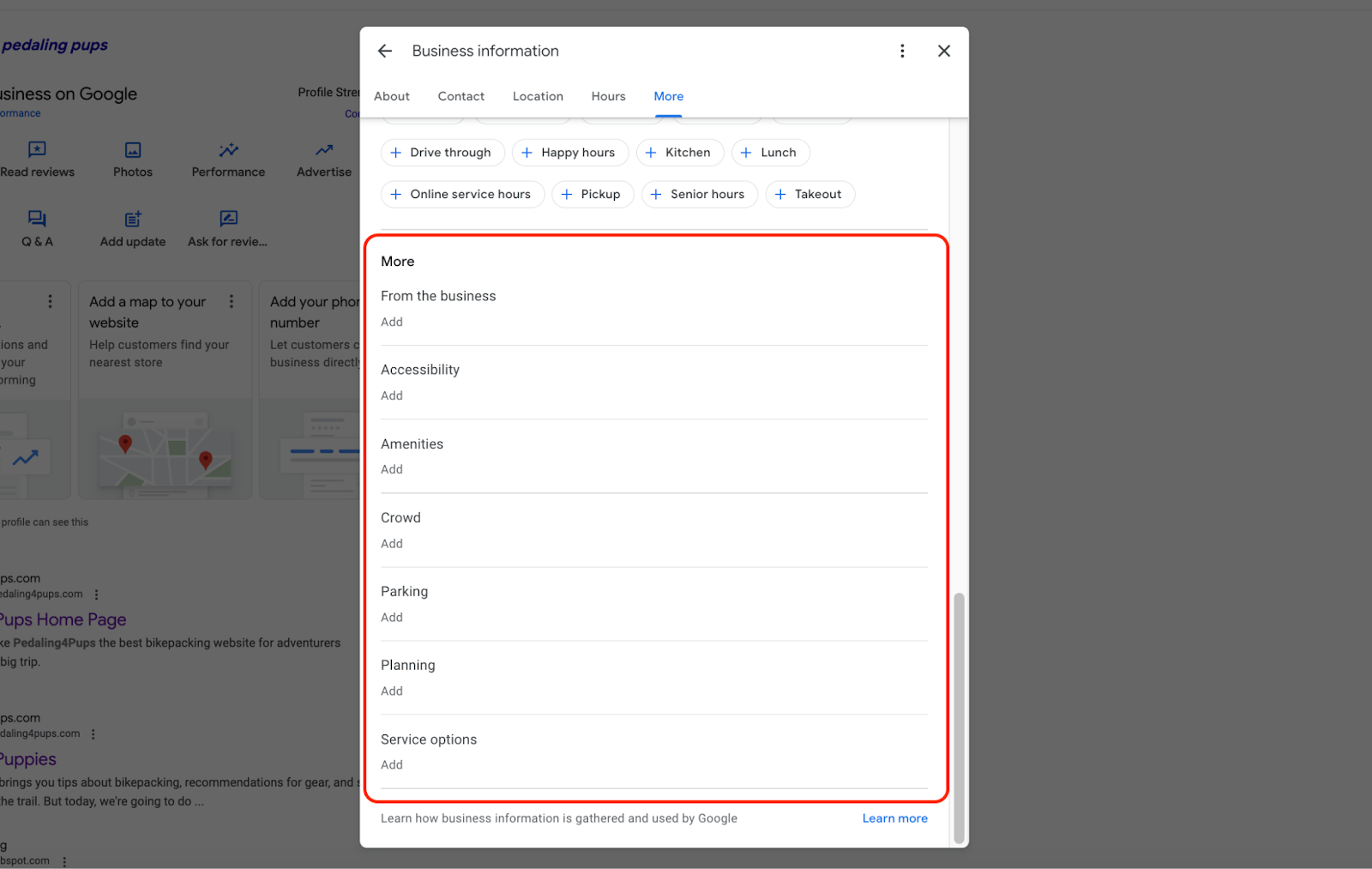
Attributes describe your business so customers know what to expect when working with your brand. You can highlight your amenities, parking, and other parts of your business that make it stand out from competitors.
To find and add attributes, go to your profile and select “Edit Profile.” Then scroll down to the bottom to the “More” section. Here, you’ll find the following attributes to add to your profile:
8. Use Google Posts to stay active
Google Posts allow you to share updates, offers, and announcements directly on your profile.
While they may not directly boost rankings, they increase engagement and give customers more reasons to choose you.
You can post:
- Promotions or seasonal offers
- Business updates
- Tips or helpful information
- Event announcements
Consistency matters more than frequency. Even one post per week can make a difference.
9. List your services and products clearly
Adding detailed services helps Google match your business to more specific searches.
Instead of just listing a category, break down what you offer with short descriptions. This improves both visibility and customer understanding.
Clear services also reduce friction when customers are deciding whether to contact you.
To add products, go to your profile and select “Edit products.”
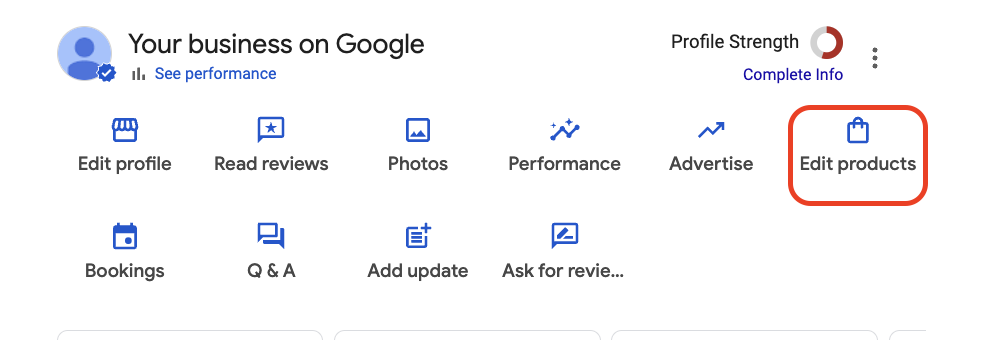
Then, add the product’s name, category, price, and description. You should also include a link to your online store or landing page where you sell it. Now, customers can go directly to your product pages via your online listing.
10. Monitor your profile’s performance.
Google Business Profile has a built-in reporting tool that shows how many people engage with your profile. It measures requests for directions to your business, online appointment bookings, and clicks to your website.
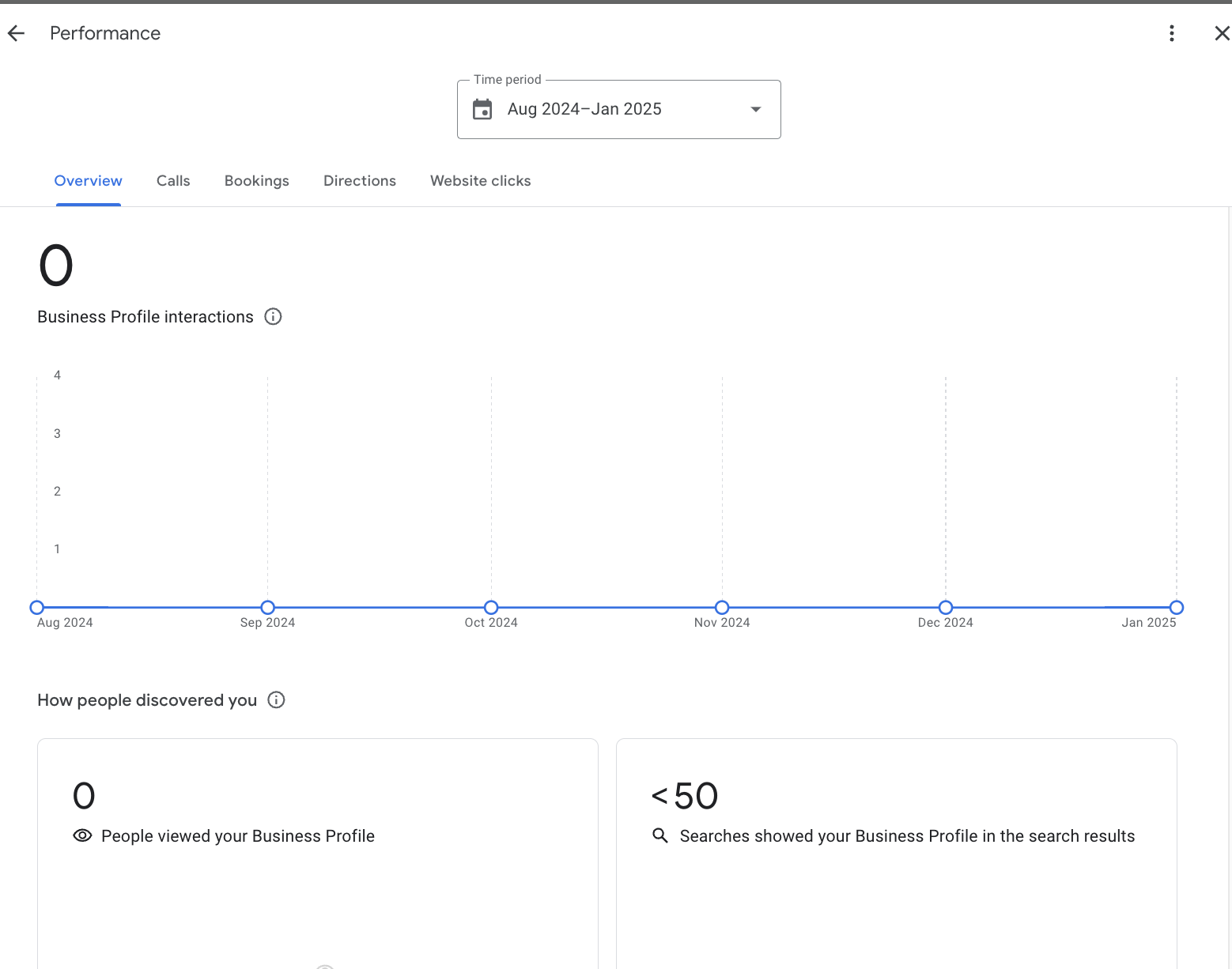
This information is valuable because it helps optimize your Google Business Profile. You can test different strategies and see how changes affect your business over time. For example, you can see if adding products increases clicks to your website or if your keyword research increases how many people request directions to your store. These reporting tools show if you’re making meaningful changes that positively impact your profile.
11. Subscribe for tips from Google.
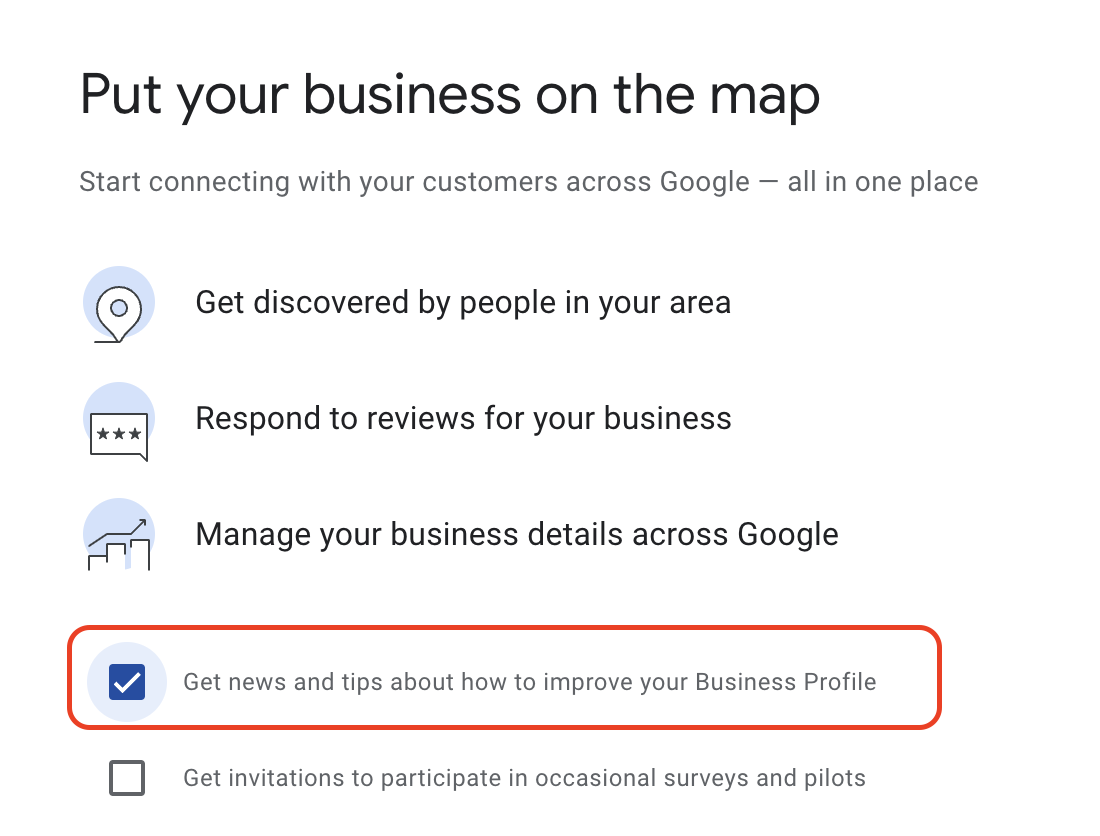
If you want to optimize your profile even more, I recommend subscribing to Google for updates. Google is constantly updating its platform; sometimes, it makes major changes to Google Business that you should be aware of. For example, it removed the chat feature last year, so businesses could no longer chat directly with their customers. You should stay in the loop on changes like these to adapt accordingly.
You can subscribe to updates when you claim your Google Business Profile. Select the checkbox in the image below to sign up for news and tips to improve your profile.
There’s even more you can do to optimize your Google Business Profile. So, to keep things simple, we created a Google Business Profile optimization checklist to organize your workload.
Google Business Profile Optimization Checklist
Here is a checklist of things you should do to optimize your Google Business Profile:
Google Business Profile Optimization Services
If you don’t have the time to update your profile on your own, you can work with a Google Business Profile optimization service that can do it for you. Some services will provide tools and experts to help you improve your SEO, while others will do all the work for you and share updates over time. Take a look at the list below and pick the option that works best for your business.
1. Thryv

Thryv doesn’t just claim your Google Business Profile; it manages it over time. Since Thryv is a Google Premier Partner, you can bypass the time-consuming verification process and get your listing published quickly. Thryv’s software keeps your data fresh and accurate and updates your company information on sites other than Google. In fact, it connects to more than 40 online directories like Yelp, Angi, TripAdvisor, and more. Thryv’s expert support team helps you optimize your profile and align your call-to-actions so that you’re not just ranking on Google but pointing customers to your website as well.
2. IndeedSEO
IndeedSEO is a Google Business Profile optimization service that overhauls your profile and improves your online presence. This service is very SEO-focused, meaning their team will geotag your images, track local rankings, and enhance your Google postings to include updates, deals, offers, and more. These things help you appear on Google’s map pack and increase your chances of ranking at the top. IndeedSEO provides additional services like on-page optimization, app store rankings, and industry-specific SEO services like banking, casinos, and more.
3. FIVE.media
FIVE.media is a marketing agency that offers SEO services ranging from site audits to Google Business Profile optimization. This company works with small businesses of all different types, including medical brands and entertainment venues. Its team audits your listing, creates an initial performance report, and provides constant updates over time. At the end of each month, they’ll provide a detailed report explaining how much you’ve grown. Additional services include social media management, email marketing, and pay-per-click (PPC) advertising.
4. Search Berg
Search Berg will completely revamp your Google Business Profile. It updates your business info, fine-tunes your service locations, and optimizes your company description. It also helps you manage your online reviews and add photos and videos of your business so customers know what it’s like working with you. They even have a free tool that audits your profile before signing up, so you can see exactly what you need to improve before hiring them. This is a great company if you have a Google Business Profile but haven’t quite figured out how to optimize it yet.
5. Merchynt
Merchynt is a local SEO service that helps you get more good reviews. Its software collects feedback and asks questions like “What do you like about this business?” Then, it writes a review for the customer and provides a way to copy and paste it into Google. This helps your SEO because the reviews are specific and provide more information about your business. Another standout feature of this service is its customer support. You’ll be connected with a Google Business expert to help you run marketing campaigns and optimize your profile. They can answer any questions you have and ensure operations run smoothly.
Turn your Google Business Profile into a consistent source of local leads
Your Google Business Profile is not just a listing. It is one of your most powerful tools for attracting and converting local customers. When it is complete, active, and aligned with how people search, it works for you around the clock.
The businesses that stand out are not doing more. They are doing the right things consistently. With the right systems in place, keeping your profile optimized does not have to take extra time. It becomes part of how you run your business.
The Ultimate Google
Business Profile
Guide
Learn how to optimize your Google Business Profile to get found online, attract leads, and boost local visibility.
FAQs
How do I optimize my Google Business Profile for local SEO?
Complete all business information, choose the correct categories, add photos, collect reviews, and post updates regularly. Consistency and activity help improve visibility in local search and Google Maps.
What factors affect Google Business Profile ranking?
Ranking is based on relevance, distance, and prominence. This includes your categories, keywords, location, reviews, and overall profile activity.
How often should I update my Google Business Profile?
You should update your profile regularly by adding photos, responding to reviews, and posting updates. Ongoing activity improves both visibility and customer engagement.