


The Google Promotions tab (aka marketing email purgatory) has long been a frustration for small businesses.
You can write a great email, hit send, and still watch it disappear into a folder most people barely check.
But here’s the good news: this isn’t random.
Email placement is driven by patterns, such as how your email looks, how people interact with it, and how trustworthy you appear as a sender. Once you understand those patterns, you can start improving where your emails land.
Market and Grow Your Business More Effectively With Thryv Marketing Center
Thryv Marketing Center helps you attract new customers to your business and shows you which marketing strategies work best for your customers so you don’t waste time and money on the wrong tactics.
Why do emails go to the Gmail Promotions Tab?
When a business sends an email, Google scans it using hundreds of signals to decide where it belongs—Primary, Social, or Promotions. The idea is to ensure the Primary Inbox remains uncluttered, making it easier for users to find the emails that matter most to them.
Emails typically land in Promotions when they look like marketing, rather than a one-to-one conversation.
Elements like multiple images, heavy formatting, and numerous links signal that your email is promotional, even if the content is valuable.
Gmail’s goal is simple: keep the Primary inbox reserved for emails users are most likely to engage with.
Remember, testing your emails by sending them to your own Gmail inbox isn’t a reliable way to measure deliverability. When you open and interact with your own messages, you’re signaling to Gmail that those emails are important, but only based on your personal behavior. Inbox placement is highly individualized, so just because one person sees an email in Promotions doesn’t mean everyone will. User engagement and sender reputation shape how Gmail sorts emails.
Email Deliverability Tips
1. Email structure impacts inbox placement.
2. Engagement signals determine inbox priority.
3. Personalization beats bulk messaging.
4. Avoid common “promotions” triggers.
5. Maintain list hygiene.
6. Use whitelisting to your advantage.
1. Email structure impacts inbox placement.
The way your email is built plays a major role in where it lands. Overuse of images, links, and formatting signals “promotional” emails, which are more likely to be filtered out of the Primary inbox.
Plain-Text vs. HTML Emails
| Plain-Text Emails | HTML Emails |
| Look like personal messages | Look like marketing campaigns |
| Minimal formatting | Designed layouts, colors, images |
| Fewer links | Multiple links and CTAs |
| Higher chance of Primary inbox | More likely Promotions placement |
The more your email looks like something you’d send manually, the better your chances of landing in Primary.
How to Improve Email Structure
- Stick to simple formatting
- Limit images (or remove them entirely)
- Use one clear call-to-action
- Avoid heavy templates or complex HTML
2. Engagement signals determine inbox priority.
Email deliverability isn’t just about what you send; it’s about how people respond.
Gmail tracks engagement signals like:
- Opens
- Replies
- Clicks
- Deletes without reading
These signals directly impact your sender reputation, which determines where your emails land over time.
What is Sender Reputation?
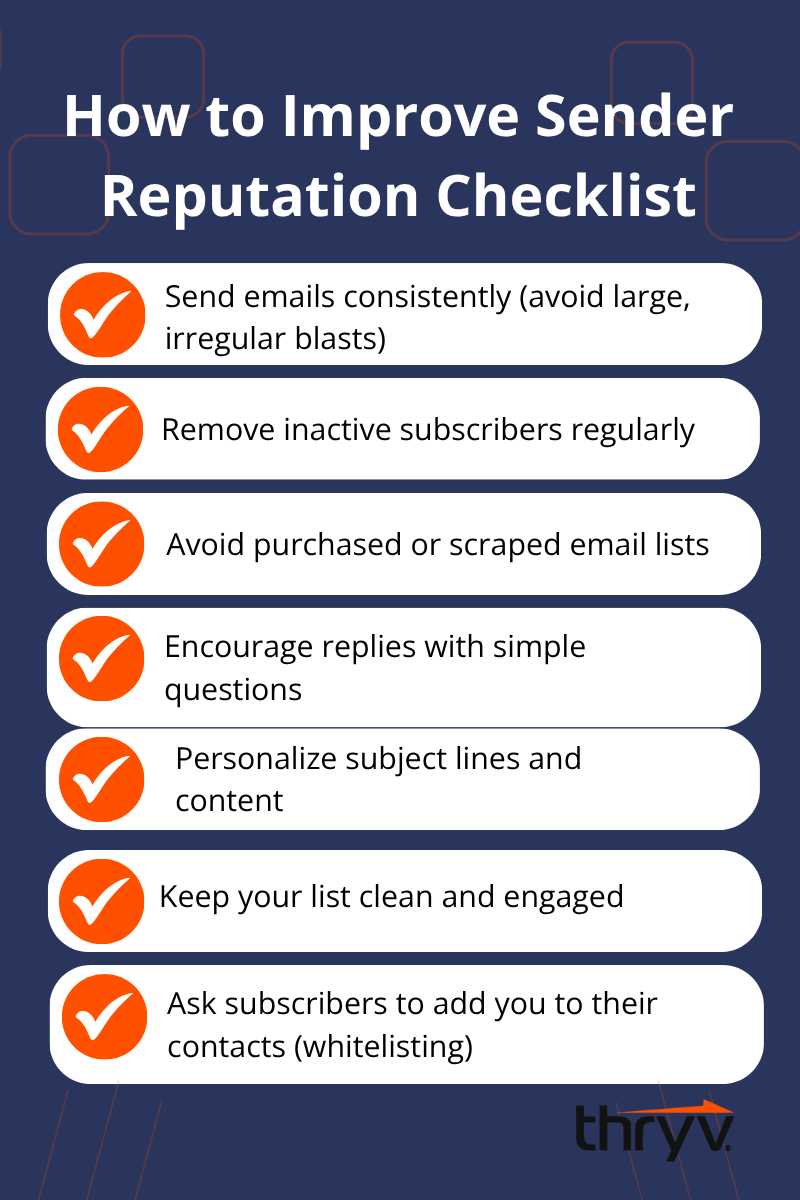
Sender reputation is your credibility score with email providers. High engagement improves it. Low engagement hurts it.
Focus on These Engagement Drivers
- Are people opening your emails?
- Are they replying or clicking?
- Are inactive subscribers dragging down your performance?
Even small improvements in engagement can significantly boost your inbox placement over time.
3. Personalization beats bulk messaging.
Short, human-like emails consistently outperform heavily designed marketing templates. People respond to emails that feel like they were written for them, not blasted to thousands.
How to Write Emails That Land in Primary
- Write like you’re emailing one person
- Use a real sender name instead of just your brand
- Keep emails short and direct
- Avoid overly polished marketing language
- Ask a question to encourage replies
- Limit links and distractions
Using AI for Smarter Personalization
AI can help scale personalization without making emails feel robotic.
- Segmentation: Group contacts based on behavior or interests.
- Dynamic messaging: Adjust content based on customer actions.
- AI-assisted writing: Speed up email creation while keeping a human tone.
The goal isn’t to automate everything; it’s to make your emails more relevant at scale.
4. Avoid common “promotions” triggers.
There are steps you can take to increase the chances that your email lands somewhere other than the Promotions tab. One way to avoid the Gmail promotions tab is to avoid practices that make your messages look like a promotion. There are certain elements that almost immediately signal a marketing email.
Avoid:
- Multiple images or banners
- More than one or two links
- Branded “from” names instead of a real person
- Fancy HTML templates
- Social media links in your signature
These features may look polished, but they often reduce deliverability.
5. Maintain list hygiene.
A healthy email list is one of the biggest drivers of deliverability.
Sending emails to disengaged contacts—people who don’t open, click, or reply—signals to Gmail that your content isn’t valuable. Over time, this hurts your sender reputation and increases the chances of landing in Promotions or even Spam.
What Good List Hygiene Looks Like
- Regularly remove or suppress inactive subscribers
- Avoid purchased or scraped email lists
- Send consistently instead of in large, unpredictable bursts
- Focus on quality over quantity
Prioritize Engagement Over Volume
It’s not about how many emails you send; it’s about how people respond.
Encourage interaction by:
- Asking simple questions
- Writing emails that invite replies
- Keeping your message focused with one clear call-to-action
Replies, in particular, are one of the strongest signals you can generate. The more your audience engages, the more Gmail sees your emails as worth delivering to the Primary inbox.
6. Use whitelisting to your advantage.
One method that is absolutely foolproof (and algorithm-proof) is asking your audience to whitelist you. Once your email recipients have told Gmail that your emails are important to them, they will keep sending things into that inbox. So, whitelist, open, click, and reply to your heart’s content.
How to Encourage Whitelisting
- Ask new subscribers to add your email to their contacts
- Include a simple instruction in your welcome email
- Remind engaged readers to mark your emails as important
Build Trust Instead of Trying to “Hack” the System
Don’t try to game the system by changing your name or address. Remember that your reputation is linked to your email address and the name text associated with it. Plus, by changing it and starting from scratch, all that effort you put into building up recognition dies. Your sender reputation follows you, and shortcuts often lead to worse deliverability over time.
Instead, focus on building trust:
- Send emails from a real person
- Keep your tone conversational
- Deliver consistent value
When your audience signals that your emails matter, Gmail follows their lead.
How to Improve Email Open Rates
By applying these straightforward principles, you’ll be able to get your email into the Gmail primary inbox so that as many people as possible will see it and open it. This will boost audience engagement, leading to higher webinar attendance and more sales.
Remember that as many as half of your audience is likely to be using some kind of email infrastructure provided by Google.
Free Email Marketing Guide for Busy Business Owners
Master email marketing with time-saving strategies that help you promote and grow your business — no big budget required.
FAQs
Q: How do I avoid the Gmail Promotions tab?
A: To avoid the Gmail Promotions tab, focus on making your emails look and feel like personal messages rather than marketing campaigns. Use simple formatting, limit images and links, and write in a conversational tone. Sending emails from a real person, encouraging replies, and maintaining a clean, engaged email list can also improve your chances of landing in the Primary inbox.
Q: Why do emails go to Promotions?
A: Emails typically go to the Promotions tab when they include elements that signal marketing, such as multiple links, images, or heavy formatting. Gmail analyzes hundreds of factors, including structure, content, and user engagement, to decide placement. If your email looks like a bulk campaign rather than a one-to-one message, it’s more likely to be filtered into Promotions.
Q: How do I improve sender reputation?
A: Improving sender reputation starts with engagement and consistency. Send emails to an opt-in audience, remove inactive subscribers, and avoid purchased lists. Encourage opens, clicks, and especially replies, since engagement signals tell email providers your content is valuable. Sending consistently and maintaining good list hygiene will help build long-term trust with inbox providers.
Q: How do I write emails that land in Primary?
A: Write emails as if you’re speaking directly to one person. Keep them short, simple, and conversational. Avoid heavy design, limit links, and use a real sender name. Asking questions and encouraging replies can also boost engagement, increasing the likelihood that your emails are delivered to the Primary inbox.