Simplifying your business.

 One software for all of your locations.

 Earn cash by referring businesses to us.



As the year winds down, most small business owners are focused on closing out projects, balancing the books, and prepping for January. But there’s one end-of-year task that often gets pushed aside, and it might be costing you more than you realize: your annual tech stack audit.
December is the ideal moment to step back and review your software subscriptions, CRM setup, payment systems, AI business tools, and automation workflows. Why? Outdated tools slow operations, limit scalability, create bottlenecks, inflate costs, and leave your team working harder than necessary. And with 2026 shaping up to be an even more AI-driven, integration-dependent year, the businesses that modernize will enter the new year stronger, leaner, and more competitive.
Build Stronger Relationships With Your Customers Using Our Mobile CRM Software for Small Businesses
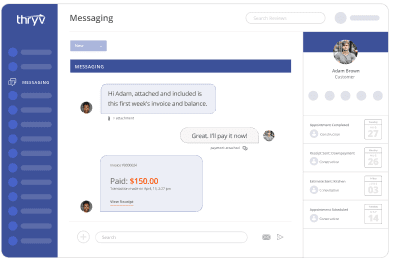
Our robust CRM software helps you build better relationships with your existing customers and nurture new leads. You can also view and manage all your communications and interactions from anywhere, including on your mobile device or desktop computer.

Why an End-of-Year Tech Audit Matters
The technology you use quietly dictates how smoothly your business runs day to day. When tools don’t integrate, you lose time switching systems. When your CRM is outdated, customer experience suffers. When your payment tools or automation workflows can’t keep up, you miss revenue and rely too heavily on manual work.
Here’s why now is the time to take inventory:
- Subscriptions renew in January. December gives you time to cancel, consolidate, or upgrade.
- Seasonal slowdowns create breathing room for evaluation.
- New AI business tools are emerging rapidly, making older software less efficient by comparison.
- Economic uncertainty makes operational efficiency and cost control more important than ever.
A thoughtful audit now prevents technology headaches later, and positions your business to grow with less effort in 2026.
How to Revamp Your Tech Stack
Step 1: Map your current tech stack.
Step 2: Evaluate each tool using three decision criteria.
Step 3: Decide what to replace before 2026.
Step 4: Identify what’s actually worth keeping.
Step 5: What to add in 2026 for a more modern, efficient tech stack.
Step 1: Map your current tech stack.
Start by listing every tool your business uses across operations, marketing, sales, scheduling, payments, customer communication, and team workflows.
Include:
- CRM and customer data tools
- Online scheduling or booking systems
- Invoicing and payment software
- Email and text marketing platforms
- Project management and internal collaboration tools
- Accounting or financial software
- AI tools
- Niche apps for reviews, social media, or forms
- Any automations or integrations connecting these tools
Document the purpose, cost, how often you use it, who uses it, and what it integrates with.
This step alone can reveal surprises such as unused subscriptions, redundant software, or outdated tools that are dragging down your workflow.
Step 2: Evaluate each tool using three decision criteria.
Not every tool should stay, and not everything should be replaced. Use these filters to evaluate each item:
1. Performance & Scalability
Ask:
- Is this slowing us down?
- Is it glitchy, outdated, or missing modern features?
- Does it handle our current workload, and can it scale with future growth?
Outdated tools often reveal themselves through slow load times, manual workarounds, and “we’ve always done it this way” habits.
2. Integration & Compatibility
Modern small businesses rely on systems that talk to each other.
Evaluate:
- Does this tool integrate with our CRM?
- Does it sync data automatically (or are we manually entering information)?
- Are important customer details living in too many separate places?
If the answer is “no” or “not really,” it may be time to replace or consolidate.
3. Automation & AI Capabilities
AI business tools and small-business automation tools can now handle tasks that were manual, time-consuming, and error-prone, including review responses, scheduling, and customer follow-ups.
Ask:
- Does this software automate routine work?
- Does it offer AI features that make operations easier, faster, or smarter?
- Are we missing out on efficiency because we’re using an older version or an outdated platform?
If a tool can’t leverage automation or AI, it’s likely holding your business back.
Step 3: Decide what to replace before 2026.
Here are clear signs a tool no longer serves you:
1. It requires too much manual work.
If you’re exporting spreadsheets, manually sending reminders, or following up with customers one by one, that tool has reached its limit.
2. It doesn’t integrate with your CRM.
When customer data is scattered, you lose context and clarity. No integration = no efficiency.
3. It creates friction for your customers.
Slow payments, confusing forms, or outdated communication channels all affect conversion.
4. It lacks AI or automation.
If the platform doesn’t automatically simplify your workload, it’s not built for 2026.
5. You need three tools when one could do the job.
Overlapping software drives up costs and complicates workflows.
Common systems to replace:
- Outdated CRMs
- Standalone marketing tools that can’t automate
- Payment apps without built-in invoicing features
- Scheduling systems with limited customer data visibility
- Reporting tools that require manual updates


Step 4: Identify what’s actually worth keeping.
It’s not all about replacement; some tools work exceptionally well and simply need optimization or better integrations.
Keep a tool if:
- It integrates seamlessly with your other systems.
- It has recently been upgraded with AI-powered features.
- Your team knows it well and uses it efficiently.
- It automates key operations.
- It brings strong ROI or saves measurable time.
Examples of software worth keeping:
- CRMs with built-in automations.
- All-in-one business platforms that centralize customer communication, scheduling, and payments.
- Tools with native integrations to your accounting system.
- AI-enhanced dashboards or reporting tools.
Before upgrading or switching providers, make sure you’re getting the most out of what you already pay for. Many platforms introduce new AI features you may not be using yet.
Step 5: What to add in 2026 for a more modern, efficient tech stack.
Once you cut the outdated and consolidate the redundant, it’s time to fill the gaps. Here’s what to consider adding:
1. An All-In-One Business Platform
Small business owners are increasingly moving away from juggling 15+ apps. Instead, they’re adopting integrated platforms that manage:
- CRM & customer communication
- Scheduling & appointments
- Payments & invoices
- Email & SMS marketing
- Reviews & online listings
- Workflow automation
- AI-powered insights
Why it matters: One login, one database, connected workflows, cleaner reporting, and fewer subscription fees.
Tip: Thryv offers all the features listed above and seamlessly integrates with your current tech stack.
2. AI Business Tools for Customer Insights & Automation
AI can now streamline or enhance:
- Review generation and responses
- Appointment reminders
- Personalized marketing messages
- Sales follow-up sequences
- Lead scoring and forecasting
- Trend and demand predictions
- Customer segmentation
- Reporting and dashboard summaries
AI isn’t a future upgrade; it’s a competitive advantage today. Businesses that adopt AI early gain speed, accuracy, and customer personalization that their competitors can’t match.
3. Tools With Native Integrations
Choose software that integrates via:
- API
- Native app connections
- Accounting plug-ins
- CRM sync
Strong integrations reduce errors, eliminate duplicate entries, and unlock reliable, real-time customer visibility.
4. Payment Tools With Built-In Automation
Look for:
- Automatic invoicing
- Card-on-file
- Recurring billing
- Instant payouts
- Mobile tap-to-pay
- Automated payment reminders
The fewer steps your customers need to take, the more revenue you capture.
5. Security, Compliance, and Backup Tools
With more AI and more customer data comes higher responsibility.
Make sure your tech stack includes:
- Encrypted data storage
- Multi-factor authentication
- Automated backups
- Compliance-ready communication and marketing tools
Your systems should protect you, not create risk.
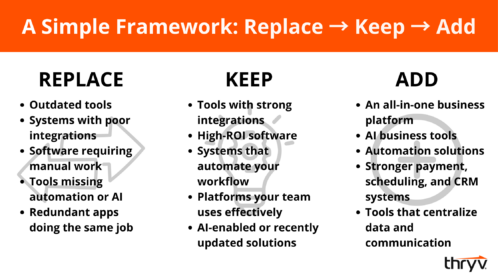
Use this checklist as your year-end tech stack guide:
Enter 2026 With a Tech Stack Built to Scale
Your business can’t grow on outdated tools. As operations become more digital, automated, and AI-driven, your tech stack plays a bigger role than ever in your productivity and profitability.
By taking time now before the year ends to evaluate what to replace, what to keep, and what to add, you’re setting your business up for smarter, more scalable operations.
CRM Cleanup Guide
Get your CRM data in tip-top shape — and keep it that way!