
 A few weeks back Facebook announced their embeddable Page posts, but at that time the feature was only available to a limited number of Facebook Pages with massive followings. We’re assuming that Facebook deemed that limited test a success because now everyone has the ability to embed their posts–both Pages and users–as long as the post privacy has been set to “public”.
Embedded posts will displace the screenshots as the way to feature Facebook posts on a web site and extend the ability to like posts and Pages away from Facebook.com which is a great way to feature your most important posts.
With this improvement Facebook joins YouTube, Twitter, Instagram and Vine who all support the embedding of posts made to their respective networks.
To Facebook embed a post into a web page, follow these steps:
- Click on the right arrow in the corner of the post you would like to embed
- Click “Embed Post”
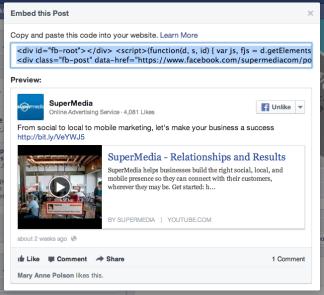
- Copy the embed code in the preview panel that pops up
- Paste the code in your HTML for your web page
- Publish
The final embedded post looks like this: