Marketing Services for Small Business: 10 Business Tasks You Should Automate Before Q4
Try Thryv for FreeBy Allison Sakounthong, Small Business Expert
Updated October 6, 2026 · 30 min read
Key Takeaways
- Automate repetitive tasks before Q4 gets busy. Lead follow-up, appointment reminders, review requests, and customer communications are good places to start.
- Use automation to stay consistent, not less personal. Let technology handle routine work, so you have more time for customers and higher-value tasks.
- Don’t overlook marketing automation. Social media, email campaigns, re-engagement, and reporting can all be streamlined to save time.
- Keep your online presence up to date. Accurate listings and consistent business information make it easier for customers to find you.
- You don’t have to automate everything yourself. The right marketing services for small business can combine AI, automation, and expert support to help you work smarter heading into Q4.
- Start small and build from there. Pick two or three repetitive tasks to automate now, measure the results, and expand as you see what works.
Q4 has a way of turning a manageable to-do list into a never-ending one.
There are more customers to reach, more appointments to manage, more promotions to run, and more follow-ups to remember. Add in the everyday work of running a business, and it’s easy to spend your best hours checking boxes instead of growing your business.
The good news? You probably don’t need to work faster. You need fewer things that require your attention in the first place.
That’s where automation comes in.
The right automation can handle repetitive tasks, keep customer communications moving, and give you more time to focus on the work only you can do. And you don’t have to automate your entire business overnight.
Start with the tasks that happen repeatedly, follow a predictable process, and take time away from customers.

4 AI Checklists to Automate and Grow Your Small Business
Free Guide
4 AI Checklists to Automate and Grow Your Small Business
Simplify your daily operations with practical AI checklists designed to save time, improve consistency, and help you scale with confidence. From CRM and content to dashboards and customer interactions, learn how to streamline the systems that power your business.
10 Business Tasks Worth Automating
1. Lead Follow-Up
A new lead doesn’t care how busy your day is.
When someone fills out a form, requests information or reaches out about your services, they expect a response. But when you’re juggling customers, employees, and everything else that comes with Q4, following up with every inquiry can become difficult.
- Sending an immediate response when a new inquiry comes in
- Following up with leads who haven’t responded
- Reminding you when a lead needs personal attention
- Prioritizing high-value or high-intent opportunities
- Keeping follow-up from falling through the cracks
The goal isn’t to automate the relationship. It’s to make sure the relationship gets a chance to start.

thryv Tip
AI can help you figure out where to focus first. Thryv’s AI Lead Insights can analyze lead activity, surface important opportunities, and help identify which leads may deserve a closer look. That means less time sorting through every inquiry and more time following up with the right ones.
2. Appointment Reminders and Confirmations
If your business relies on appointments, you know how much time can go into managing them.
Customers need confirmation. Then they need a reminder. Someone may need to reschedule. Another customer may forget altogether.
Instead of handling every reminder manually, automate the routine communication around appointments.
Consider setting up automated:
- Appointment confirmations
- Reminder messages
- Rescheduling instructions
- Follow-ups after missed appointments
- Post-appointment messages
Your customers get timely updates, and your team doesn’t have to remember every step.
That’s a win for everyone, especially during a busy quarter.
3. Review Requests
Happy customers are one of your best marketing assets. But asking every customer for a review can quickly become another task that gets pushed down the list.
Automated review requests make it easier to consistently ask customers for feedback after a completed job, purchase or appointment.
A simple workflow could look like this:
Customer completes a service → automated review request → customer leaves feedback → your team responds
The important part is consistency. You don’t have to remember to ask every customer. Your system can do the asking for you while you focus on delivering a great experience.
thryv Tip
Reviews are part of your broader online presence. Thryv helps businesses manage listings and reviews in one place, while AI Review Response can help you respond to customer feedback more efficiently. That makes it easier to stay engaged with your reputation without constantly monitoring every platform.
4. Social Media Posting
You don’t need another thing on your calendar that says, “Post something today.”
Q4 gives you plenty to talk about, from seasonal promotions and special offers to holiday hours and helpful customer tips. The challenge is keeping up with it all.
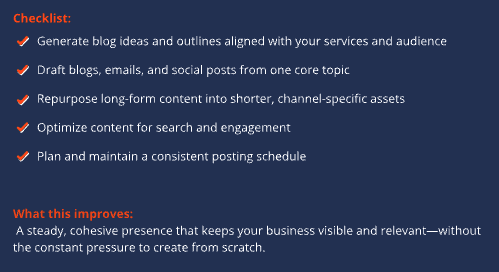
Instead of creating and publishing every post in real time, plan your content ahead of time and automate the publishing process.
You can:
- Batch-create several posts at once
- Schedule seasonal content in advance
- Repurpose existing content
- Create posts around promotions and important dates
- Use AI to help brainstorm captions and content ideas
Automation doesn’t mean your social presence has to feel automated. It simply means you don’t have to stop what you’re doing every day to keep it active.
5. Email Marketing Campaigns
Email can be one of the easiest marketing channels to automate because many campaigns follow predictable patterns.
Think beyond one-off promotional emails. You can build automated campaigns for different points in the customer journey.
For example:
- Welcome emails for new customers
- Follow-ups after an inquiry
- Seasonal promotions
- Appointment reminders
- Re-engagement campaigns
- Post-purchase follow-ups
The biggest advantage is timing.
Instead of remembering to send the right message at the right time, you can create the workflow once and let it run.
thryv Tip
Marketing automation works best when it supports a larger growth strategy. Thryv brings marketing tools, automation and AI-powered insights together so businesses can spend less time managing individual marketing tasks and more time acting on opportunities.
6. Customer Re-Engagement
Your next customer may already be a customer.
Q4 is a good time to look at the people who have purchased from you before but haven’t returned recently. Depending on your business, that could mean reminding someone it’s time for another service, promoting a seasonal offering, or simply giving past customers a reason to come back.
Automation can help you create re-engagement campaigns based on customer activity.
For example:
Customer hasn’t booked in six months → automated reminder → special offer or helpful service recommendation
You can also segment customers based on past purchases, services, or interactions to make your messages more relevant.
The goal is simple: stay connected without having to manually remember who needs to hear from you.
thryv Tip
Automation can help turn customer follow-up into an ongoing process instead of another item on your daily checklist. With Thryv, businesses can use automated marketing and customer communications to stay engaged while keeping their focus on running the business.
7. Marketing Reporting
Here’s a task you shouldn’t wait until January to automate.
If you’re running promotions, social campaigns, email marketing, or advertising in Q4, you need to know what’s working while there’s still time to do something about it.
Automated reporting can help you keep an eye on:
- Leads generated
- Customer activity
- Campaign performance
- Marketing channels
- Conversions
- Return on marketing investment
Instead of manually pulling numbers from multiple platforms every week, set up recurring reports that give you the information you need.
The point isn’t to create more reports.
It’s to make better decisions with less work.
thryv Tip
Thryv’s reporting capabilities are designed to help businesses connect marketing activity with business outcomes. With a clearer view of performance, you can spend less time gathering numbers and more time figuring out where your marketing dollars are working hardest.
8. Online Listings Management
When customers search for your business, the information they find needs to be accurate.
That includes your:
- Business name
- Address
- Phone number
- Hours
- Website
- Services
- Holiday hours
Keeping that information updated across multiple directories can be tedious, particularly when your schedule gets packed.
Before Q4, take some time to audit your listings. Then look for ways to simplify ongoing updates.
This is especially important before the holidays, when a customer showing up at an outdated business address or arriving after an old closing time can quickly become a bad experience.
thryv Tip
Getting found starts with having accurate information where customers search. Thryv’s listing tools help businesses manage their online presence across directories, making it easier to keep important business information consistent and up to date.
9. Customer Communications
Not every customer message needs to be written from scratch.
Some communications are predictable enough to automate while still being useful to your customers.
Think about messages such as:
- “We’ve received your request.”
- “Your appointment is confirmed.”
- “Your service is complete.”
- “It’s time to schedule your next service.”
- “How did we do?”
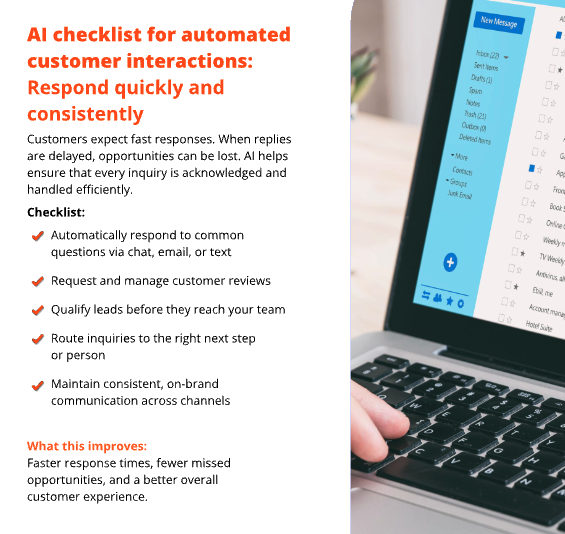
Automating these routine touchpoints helps customers stay informed without requiring someone on your team to manually send every message.
Just remember: automation should handle the predictable stuff. When a customer has a question, concern, or unusual request, make it easy for a real person to step in.
thryv Tip
The goal of automation isn’t to remove the human side of your business. It’s to give you more time for it. Thryv connects marketing, automation, AI insights, and business tools so routine work can happen in the background while you focus on customers.
10. Marketing Tasks You Don’t Have Time to Do
Here’s the reality: Sometimes the best task to automate is the one you shouldn’t have to do yourself.
As Q4 approaches, look at your marketing list and ask:
What keeps getting pushed to next week?
Maybe it’s SEO. Maybe it’s social media. Maybe it’s keeping up with online listings or launching your next advertising campaign.
If a marketing task is important but consistently doesn’t get done, consider whether it can be automated, streamlined, or handled by someone else.
That’s where the right marketing services for small businesses can make a difference.
You can use technology to handle repetitive work. You can also work with marketing experts for tasks that require strategy, creativity, or ongoing optimization.
And you don’t necessarily have to choose one or the other.
thryv Tip
Thryv gives businesses flexibility in how they approach marketing. With Thryv’s AI-powered Growth Platform, you can use technology to manage marketing yourself, get help from Thryv experts through done-for-you services or combine both approaches based on what your business needs.
How to Decide What to Automate First
You don’t need to automate everything before Q4.
In fact, trying to automate everything at once can create more work than it saves.
Instead, look for tasks that check at least a few of these boxes:
It’s repetitive
If you do the same thing every day, week, or month, it’s a good candidate.
It’s predictable
If the task follows the same basic steps every time, automation may be able to handle it.
It takes too much time
Pay attention to the small tasks that add up. Five minutes here and 10 minutes there can become hours each week.
It affects the customer experience
Automating timely reminders, follow-ups, and updates can help customers get the information they need when they need it.
It can be measured
The best automation has a clear outcome. You should be able to tell whether it saves time, improves response rates, generates more leads or contributes to revenue.
A simple rule to remember:
If you do the same task over and over, ask whether you should still be doing it manually.
Try the New Thryv Experience
See what’s new — and why it gives your business an edge.
Frequently asked questions on Marketing Automation
Small businesses should consider automating repetitive tasks such as lead follow-up, appointment reminders, review requests, social media posting, email campaigns, customer re-engagement, reporting and routine customer communications.
Marketing automation uses software to handle repetitive marketing and customer communication tasks automatically. This can include sending emails, following up with leads, scheduling social media posts, requesting reviews and tracking campaign performance.
Automation reduces the amount of repetitive work employees and business owners have to complete manually. It can also help ensure important tasks, such as lead follow-up and customer reminders, happen consistently and on time.
Small businesses can automate many routine marketing tasks, including email campaigns, lead follow-up, social media scheduling, review requests, customer re-engagement, online listings updates and marketing reporting.
The best marketing services depend on a business’s goals, but useful services can include SEO, social media marketing, online listings management, reputation management, advertising, email marketing and marketing automation. The most effective approach combines the services and tools that help a business get found, attract customers and measure marketing results.